HTML zu PDF

HTML und CSS als PDF rendern

HTML-Code oder Dateien laden und das Ergebnis als PDF für Reports, Templates, Rechnungen und Druck exportieren.

  • Kostenlos nutzbar
  • Keine Registrierung nötig
  • PNG · JPG · WebP · PDF

Eingebettete HTML-Stile bleiben erhalten. Lokale Bilder und Schriften werden nicht automatisch hochgeladen; nutzen Sie öffentliche URLs oder eingebettete Ressourcen.

Handy-Voreinstellungen zeigen ein Browserfenster, kein echtes Gerät. Lange Seiten und nachgeladene Inhalte können unvollständig sein.

Diese Seite konzentriert sich auf HTML-to-PDF-Intention, die sich klar von gewöhnlichen HTML-Screenshot-Suchen unterscheidet. Sie passt zu Dokument-Workflows wie Reports, Templates, Rechnungen und druckbaren Seiten.

See a real example and conversion limits
Beliebte Aufgaben

Real input. Actual output.

An actual PDF exported from complete HTML

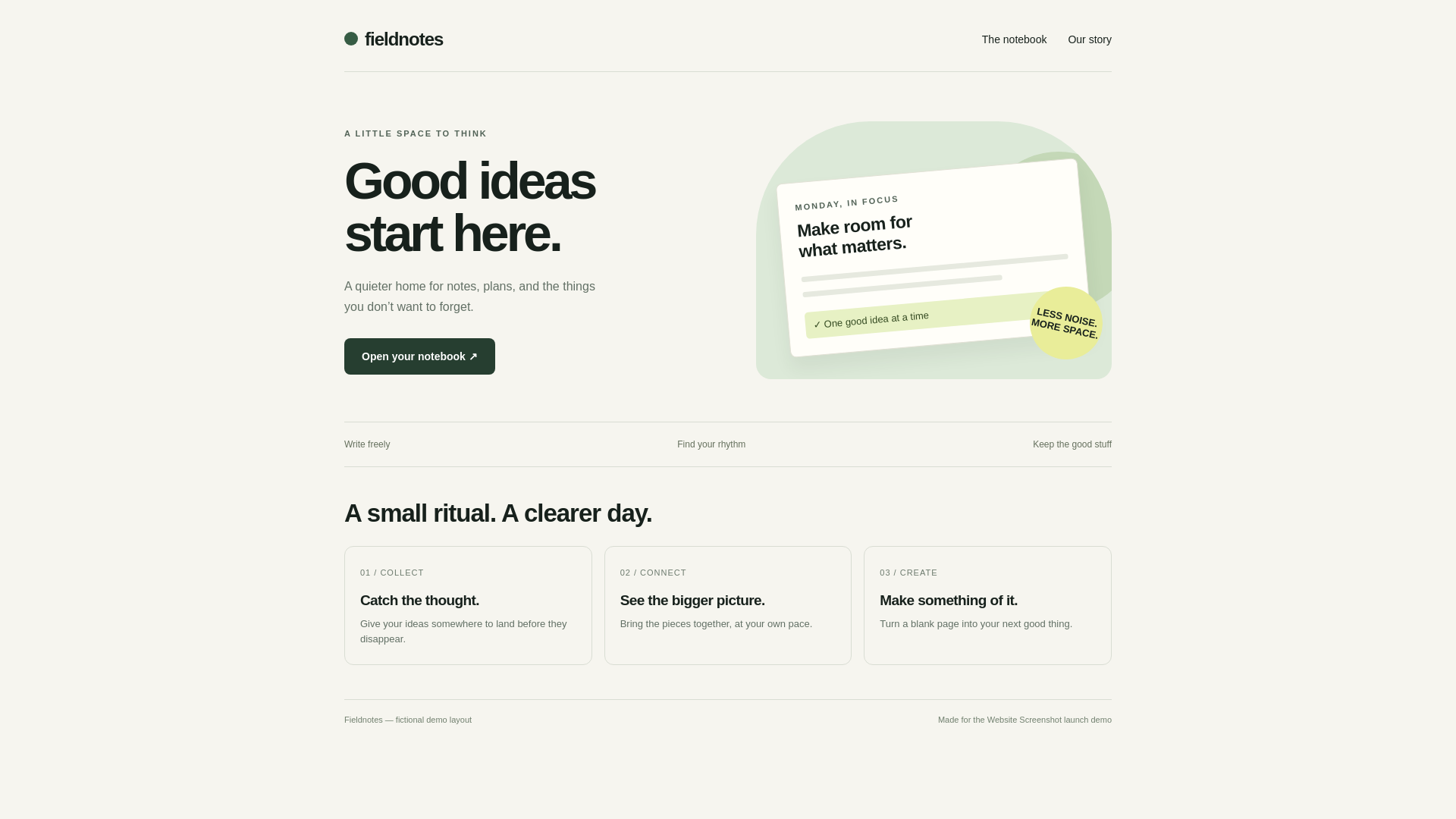
Export the complete Fieldnotes document with embedded CSS as PDF. Download the source and actual PDF below. The reference image is a PNG from the same HTML, not a preview of PDF pagination.

Input: complete HTML document

/examples/tutorials/fieldnotes.htmlDownload the example HTML

Settings to reproduce

  • Complete HTML; separate CSS field empty
  • Format: PDF; Desktop preset; original output size
  • Delay: 1000 ms; print stylesheet off

Try it yourself

  1. Download the source and paste the complete HTML.
  2. Choose PDF in Output and leave the separate CSS field empty.
  3. Convert and download; inspect page breaks in a PDF reader.
Try these settings in the tool
PNG reference from the same Fieldnotes HTML; not a PDF page preview
Actual PDF exported through this tool on 25 October 2026. The reference image is a PNG of the same HTML; PDF page breaks can differ.
Download the actual HTML-to-PDF export

Limitations to know before converting

Complete documents and extra CSS

Embedded style blocks are retained. CSS entered in the separate field is appended after the document styles, so normal CSS specificity and source order apply. A matching rule can override an earlier one.

Images, fonts, and local files

Relative file paths and files on your computer are not automatically uploaded with pasted HTML. Use publicly accessible absolute URLs or inline assets. Blocked resources and fonts that load late can change the result.

PDF layout is not a long PNG

PDF output can paginate and reflow content. Paper size, margins, print CSS, and the target website affect page breaks. Full-page capture does not promise a single extra-long PDF page.

Print CSS and browser printing

Enabling Print stylesheet asks the renderer to use the website’s print styles, which may hide navigation or change the layout. Your browser’s local Print → Save as PDF may differ because of login state, fonts, printer settings, and loaded content.

Häufige Anwendungsfälle

Wann HTML to PDF sinnvoll ist

Wann HTML to PDF am meisten Sinn ergibt

Für Rechnungen, Reports, Vorlagen und druckbare Seiten ist PDF meist sinnvoller als eine Bildausgabe aus HTML.

FAQ

HTML-zu-PDF FAQ

Ist Website Screenshot kostenlos und brauche ich ein Konto?+

Ja. Die Online-Tools für Screenshots und HTML-Konvertierung sind kostenlos und ohne Registrierung oder Installation nutzbar.

Wann sollte ich HTML to PDF statt HTML to PNG verwenden?+

Wenn das Ergebnis gedruckt, archiviert oder als Dokument weitergegeben werden soll.

Kann ich HTML-Dateien hochladen und als PDF exportieren?+

Ja. Datei-Upload wird unterstützt.

Ist das für Rechnungs- und Report-Templates geeignet?+

Ja. Solche dokumentartigen HTML-Layouts passen sehr gut zu PDF.

Deckt die Seite auch render HTML to PDF ab?+

Ja. Auch ähnliche Suchanfragen wie convert HTML file to PDF oder print HTML as PDF sind passend.

Kann ich lange HTML-Seiten als PDF exportieren?+

Ja. Auch längere Bericht- und Template-Seiten lassen sich als PDF sichern.

Verwandte Tools

Verwandte Seiten