Website Screenshot ·
How to Convert HTML to JPG Online: A Working Example
To convert HTML to JPG, paste a complete document into HTML Screenshot, leave the separate CSS field empty if the document already contains its styles, choose JPG, and generate the image. This walkthrough uses Fieldnotes, an original fictional layout, and provides the exact source plus an actual service export. It requires no browser extension or local rendering script.
Open the tool and follow alongDownload and inspect the complete source
All exports below use this original HTML: embedded CSS, system fonts and an opaque background wrapper, with no external image or font requests.
Download Fieldnotes HTMLShow the complete HTML
<!DOCTYPE html>
<html lang="en"><head><meta charset="utf-8"><meta name="viewport" content="width=device-width,initial-scale=1"><title>Fieldnotes — demo page</title>
<style>
*{box-sizing:border-box}body{margin:0;background:#f6f5ef;color:#17211c;font-family:Arial,Helvetica,sans-serif}main{max-width:1120px;margin:auto;padding:38px 54px 52px}nav{display:flex;align-items:center;justify-content:space-between;font-size:14px;border-bottom:1px solid #d9ddd3;padding-bottom:28px}.brand{font-size:24px;letter-spacing:-1px;font-weight:800}.dot{display:inline-block;width:18px;height:18px;border-radius:50%;background:#365c44;margin-right:9px}.navlinks{display:flex;gap:28px}.tag{font-size:11px;font-weight:700;letter-spacing:2px;color:#526357}.hero{display:grid;grid-template-columns:1.1fr 1fr;gap:28px;padding:65px 0 56px;align-items:center}h1{font-size:68px;line-height:1.01;letter-spacing:-4px;margin:20px 0 24px;font-weight:800}p{font-size:16px;line-height:1.65;color:#627065;max-width:350px}.cta{display:inline-block;background:#263e30;color:white;border-radius:8px;padding:16px 23px;font-size:14px;font-weight:700;margin-top:12px}.art{height:340px;background:#dce9d8;border-radius:150px 150px 20px 20px;position:relative;overflow:hidden}.circle{position:absolute;width:210px;height:210px;border-radius:50%;background:#c4d8b7;right:-35px;top:40px}.note{position:absolute;background:#fffef9;border:1px solid #e1e1d5;box-shadow:0 15px 25px #263e3012;border-radius:8px;padding:22px;left:35px;right:35px;top:65px;transform:rotate(-5deg)}.note h3{font-size:23px;margin:10px 0 20px;letter-spacing:-.5px}.line{height:7px;border-radius:3px;background:#e6e9df;margin:13px 0}.tick{background:#e7f1c4;color:#354b22;border-radius:5px;padding:10px;font-size:13px;margin-top:20px}.sticker{position:absolute;right:12px;bottom:26px;background:#e9ed99;border-radius:50%;width:96px;height:96px;display:flex;align-items:center;justify-content:center;text-align:center;transform:rotate(12deg);font-size:13px;font-weight:700}.strip{padding:22px 0;border-top:1px solid #d9ddd3;border-bottom:1px solid #d9ddd3;display:flex;justify-content:space-between;font-size:12px;color:#65705d}.section{padding-top:42px}h2{font-size:33px;letter-spacing:-1px;margin:0 0 24px}.cards{display:grid;grid-template-columns:repeat(3,1fr);gap:16px}.card{padding:24px 20px;border:1px solid #d9ddd3;border-radius:12px;min-height:155px}.card .number{font-size:11px;letter-spacing:1px;color:#6c7a6d}.card h3{font-size:19px;letter-spacing:-.6px;margin:18px 0 10px}.card p{font-size:13px;line-height:1.5;margin:0}.footer{display:flex;justify-content:space-between;margin-top:45px;padding-top:20px;border-top:1px solid #d9ddd3;color:#71806f;font-size:11px}
@media(max-width:600px){main{padding:25px 24px 32px}.brand{font-size:21px}.navlinks{gap:15px;font-size:11px}.hero{grid-template-columns:1fr;padding:36px 0 28px;gap:28px}h1{font-size:55px;letter-spacing:-3px;margin:18px 0}.art{height:300px}.note{top:45px}.strip{font-size:10px;gap:12px}.cards{grid-template-columns:1fr}.card{min-height:130px;padding:22px}.section{padding-top:30px}h2{font-size:29px}.footer{font-size:9px;gap:10px}}
</style></head><body><div class="example-canvas" style="background:#f6f5ef;min-height:1080px"><main><nav><div class="brand"><span class="dot"></span>fieldnotes</div><div class="navlinks"><span>The notebook</span><span>Our story</span></div></nav><section class="hero"><div><span class="tag">A LITTLE SPACE TO THINK</span><h1>Good ideas<br>start here.</h1><p>A quieter home for notes, plans, and the things you don’t want to forget.</p><span class="cta">Open your notebook ↗</span></div><div class="art"><div class="circle"></div><div class="note"><span class="tag">MONDAY, IN FOCUS</span><h3>Make room for<br>what matters.</h3><div class="line"></div><div class="line" style="width:75%"></div><div class="tick">✓ One good idea at a time</div></div><div class="sticker">LESS NOISE.<br>MORE SPACE.</div></div></section><div class="strip"><span>Write freely</span><span>Find your rhythm</span><span>Keep the good stuff</span></div><section class="section"><h2>A small ritual. A clearer day.</h2><div class="cards"><div class="card"><span class="number">01 / COLLECT</span><h3>Catch the thought.</h3><p>Give your ideas somewhere to land before they disappear.</p></div><div class="card"><span class="number">02 / CONNECT</span><h3>See the bigger picture.</h3><p>Bring the pieces together, at your own pace.</p></div><div class="card"><span class="number">03 / CREATE</span><h3>Make something of it.</h3><p>Turn a blank page into your next good thing.</p></div></div></section><div class="footer"><span>Fieldnotes — fictional demo layout</span><span>Made for the Website Screenshot launch demo</span></div></main></div></body></html>
Reproduce the export step by step
- Download the example HTML below and open it in a text editor. Copy the entire document, including DOCTYPE, head, style and body.
- Open HTML Screenshot. Choose Manual input, click CSS and clear any sample CSS. Click HTML and paste the complete document. Pasting into the HTML field is different from pasting a URL.
- In Display, choose Desktop (1920 × 1080) and leave display zoom at 100%. The HTML workflow captures the rendered document; a taller document can produce a taller image.
- In Output, choose JPG, enter 90 in JPG quality and keep the output size Original. The quality value is an encoder setting, not a percentage guarantee of visual accuracy.
- Keep the wait delay at 1000 ms and Print stylesheet off. This example uses system fonts and no network images, so it does not need a wait selector.
- Click Convert to Image, wait for the result and choose Download original. Open the downloaded file at 100% to check text, background, dimensions and the bottom of the layout.
Actual exports and original downloads
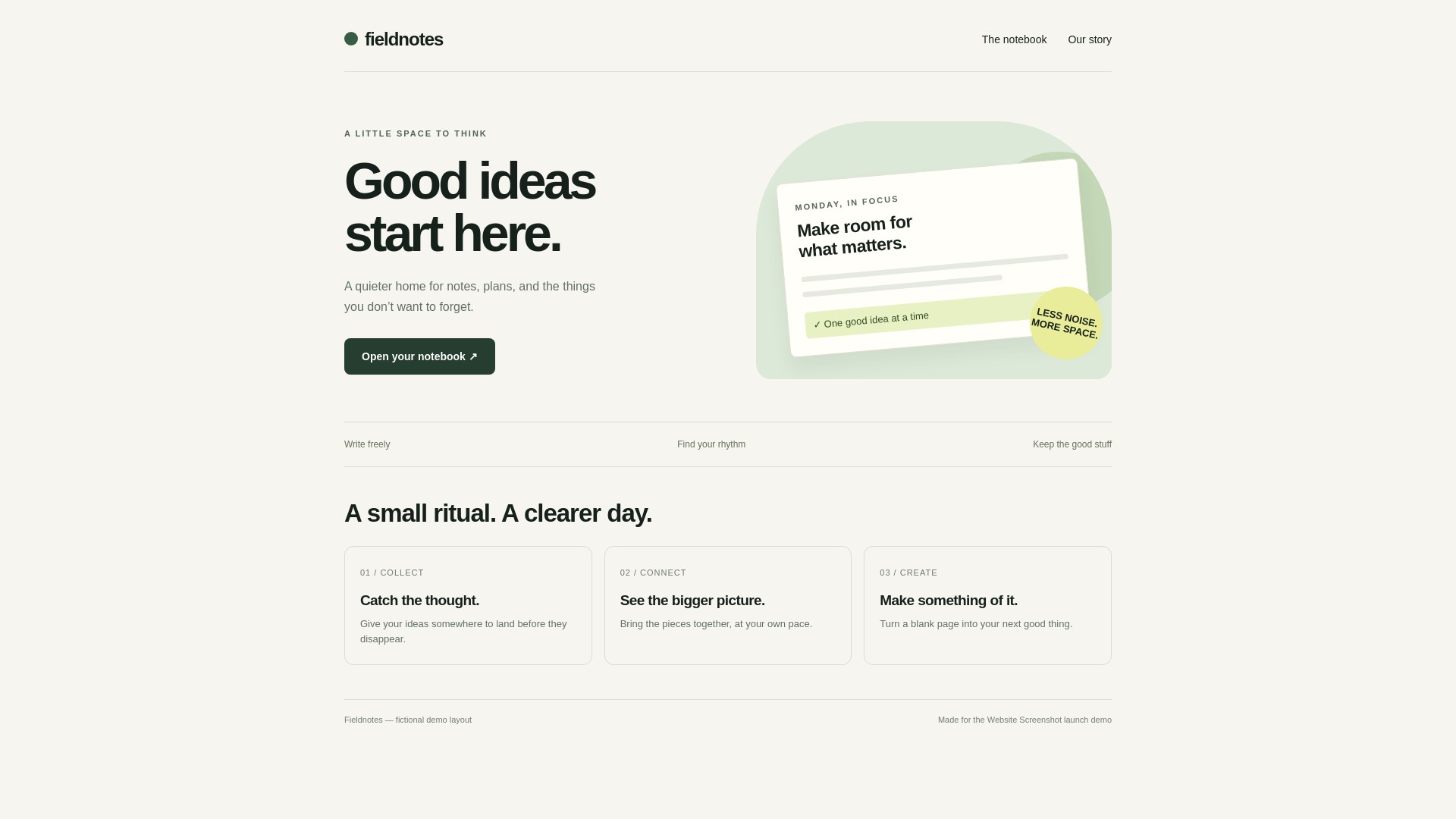
Generated through the public tool on 24 October 2026, all at 1920 × 1080. Display zoom: 100%; output size: Original; wait: 1000 ms; Print stylesheet: off. These previews are scaled: download the originals to judge detail.
Download the original service file
What you are converting
HTML source describes the page; a JPG stores a static raster rendering. The download contains visible pixels rather than editable HTML. Buttons, links, forms, animations and video do not remain interactive.
Fieldnotes contains text, CSS shapes and cards. The example-canvas wrapper has an explicit opaque background and a minimum height of 1080px. It makes the source suitable for comparing JPG and PNG without a transparent page background changing the apparent color. Fieldnotes is demonstration content, not a customer endorsement.
Why the separate CSS field is empty
The complete document already includes its own style block. The tool retains that block and appends any CSS from the separate field after it. Sample rules left in that field can override matching rules in your document.
Use the separate field deliberately for additional styles. If the export differs from the input, clear that field first and compare the actual downloaded result, rather than the scaled editor preview.
<style>
  .card { border-radius: 12px; }
</style>
<!-- Keep this inside your complete HTML document. -->
Uploading instead of pasting
File upload accepts .html, .htm, .css and .mhtml, up to 10 MB per file. Upload the downloaded .html source if that is more convenient, then inspect the preview before converting.
Uploading one HTML file does not upload a folder of images and fonts. ZIP resource bundles are not supported. MHTML attempts to extract HTML and supported embedded resources; it is not a guarantee that an arbitrary saved website will be reproduced completely.
What to check before sharing a JPG
JPG uses lossy compression and cannot preserve transparency. Text edges may look softer than PNG, especially after another application resizes or recompresses the file. Use the original download for comparison.
For a page with dense text or fine UI lines, compare the PNG in the format guide before choosing JPG. For a photograph-heavy layout, run a new test with your actual content: this CSS-and-text example does not establish a universal file-size advantage.
If the result is incomplete or different
Use an accessible absolute URL or inline data for image and font resources. A relative reference such as ./logo.png does not include the image from your computer. Authentication, blocked requests and fonts that arrive late can also change rendering.
The converter sends the HTML to a remote rendering service. It does not inherit your local browser login, VPN or localhost access. Waiting can help a slow public resource but cannot unlock a private one. Review the troubleshooting guide for a repeatable way to isolate the cause.
Frequently asked questions
Is JPG the same as JPEG?
Yes. JPG and JPEG are common filename extensions for the same image format. The real download in this example has a .jpg extension.
Does the example require an account?
No. These documented exports were generated using the public tool in an anonymous browser session. This is not a promise of unlimited use or constant availability.
Will every HTML document become 1920 × 1080?
No. Those are the tested source and viewport settings for this example. Longer content, a different viewport or output-size controls can change the exported dimensions.
References and test scope
These guides are based on the actual exports above. Results describe this input and the recorded settings, not a performance, size or compatibility guarantee for every page.