Website Screenshot ·
HTML to PNG vs JPG: Compare Real Exports Before Choosing
Choose PNG when preserving sharp text, UI edges or transparency matters. Consider JPG when a lossy image is acceptable and the measured file size suits your use. There is no format that always produces the smallest useful result. Below are real PNG, JPG quality 90 and JPG quality 60 exports of the same complete HTML document, with the same viewport and an explicit opaque background.
Open the tool and follow alongDownload and inspect the complete source
All exports below use this original HTML: embedded CSS, system fonts and an opaque background wrapper, with no external image or font requests.
Download Fieldnotes HTMLShow the complete HTML
<!DOCTYPE html>
<html lang="en"><head><meta charset="utf-8"><meta name="viewport" content="width=device-width,initial-scale=1"><title>Fieldnotes — demo page</title>
<style>
*{box-sizing:border-box}body{margin:0;background:#f6f5ef;color:#17211c;font-family:Arial,Helvetica,sans-serif}main{max-width:1120px;margin:auto;padding:38px 54px 52px}nav{display:flex;align-items:center;justify-content:space-between;font-size:14px;border-bottom:1px solid #d9ddd3;padding-bottom:28px}.brand{font-size:24px;letter-spacing:-1px;font-weight:800}.dot{display:inline-block;width:18px;height:18px;border-radius:50%;background:#365c44;margin-right:9px}.navlinks{display:flex;gap:28px}.tag{font-size:11px;font-weight:700;letter-spacing:2px;color:#526357}.hero{display:grid;grid-template-columns:1.1fr 1fr;gap:28px;padding:65px 0 56px;align-items:center}h1{font-size:68px;line-height:1.01;letter-spacing:-4px;margin:20px 0 24px;font-weight:800}p{font-size:16px;line-height:1.65;color:#627065;max-width:350px}.cta{display:inline-block;background:#263e30;color:white;border-radius:8px;padding:16px 23px;font-size:14px;font-weight:700;margin-top:12px}.art{height:340px;background:#dce9d8;border-radius:150px 150px 20px 20px;position:relative;overflow:hidden}.circle{position:absolute;width:210px;height:210px;border-radius:50%;background:#c4d8b7;right:-35px;top:40px}.note{position:absolute;background:#fffef9;border:1px solid #e1e1d5;box-shadow:0 15px 25px #263e3012;border-radius:8px;padding:22px;left:35px;right:35px;top:65px;transform:rotate(-5deg)}.note h3{font-size:23px;margin:10px 0 20px;letter-spacing:-.5px}.line{height:7px;border-radius:3px;background:#e6e9df;margin:13px 0}.tick{background:#e7f1c4;color:#354b22;border-radius:5px;padding:10px;font-size:13px;margin-top:20px}.sticker{position:absolute;right:12px;bottom:26px;background:#e9ed99;border-radius:50%;width:96px;height:96px;display:flex;align-items:center;justify-content:center;text-align:center;transform:rotate(12deg);font-size:13px;font-weight:700}.strip{padding:22px 0;border-top:1px solid #d9ddd3;border-bottom:1px solid #d9ddd3;display:flex;justify-content:space-between;font-size:12px;color:#65705d}.section{padding-top:42px}h2{font-size:33px;letter-spacing:-1px;margin:0 0 24px}.cards{display:grid;grid-template-columns:repeat(3,1fr);gap:16px}.card{padding:24px 20px;border:1px solid #d9ddd3;border-radius:12px;min-height:155px}.card .number{font-size:11px;letter-spacing:1px;color:#6c7a6d}.card h3{font-size:19px;letter-spacing:-.6px;margin:18px 0 10px}.card p{font-size:13px;line-height:1.5;margin:0}.footer{display:flex;justify-content:space-between;margin-top:45px;padding-top:20px;border-top:1px solid #d9ddd3;color:#71806f;font-size:11px}
@media(max-width:600px){main{padding:25px 24px 32px}.brand{font-size:21px}.navlinks{gap:15px;font-size:11px}.hero{grid-template-columns:1fr;padding:36px 0 28px;gap:28px}h1{font-size:55px;letter-spacing:-3px;margin:18px 0}.art{height:300px}.note{top:45px}.strip{font-size:10px;gap:12px}.cards{grid-template-columns:1fr}.card{min-height:130px;padding:22px}.section{padding-top:30px}h2{font-size:29px}.footer{font-size:9px;gap:10px}}
</style></head><body><div class="example-canvas" style="background:#f6f5ef;min-height:1080px"><main><nav><div class="brand"><span class="dot"></span>fieldnotes</div><div class="navlinks"><span>The notebook</span><span>Our story</span></div></nav><section class="hero"><div><span class="tag">A LITTLE SPACE TO THINK</span><h1>Good ideas<br>start here.</h1><p>A quieter home for notes, plans, and the things you don’t want to forget.</p><span class="cta">Open your notebook ↗</span></div><div class="art"><div class="circle"></div><div class="note"><span class="tag">MONDAY, IN FOCUS</span><h3>Make room for<br>what matters.</h3><div class="line"></div><div class="line" style="width:75%"></div><div class="tick">✓ One good idea at a time</div></div><div class="sticker">LESS NOISE.<br>MORE SPACE.</div></div></section><div class="strip"><span>Write freely</span><span>Find your rhythm</span><span>Keep the good stuff</span></div><section class="section"><h2>A small ritual. A clearer day.</h2><div class="cards"><div class="card"><span class="number">01 / COLLECT</span><h3>Catch the thought.</h3><p>Give your ideas somewhere to land before they disappear.</p></div><div class="card"><span class="number">02 / CONNECT</span><h3>See the bigger picture.</h3><p>Bring the pieces together, at your own pace.</p></div><div class="card"><span class="number">03 / CREATE</span><h3>Make something of it.</h3><p>Turn a blank page into your next good thing.</p></div></div></section><div class="footer"><span>Fieldnotes — fictional demo layout</span><span>Made for the Website Screenshot launch demo</span></div></main></div></body></html>
Reproduce the export step by step
- Download the common HTML source. Paste it into HTML Screenshot and clear the separate CSS field.
- Use Desktop (1920 × 1080), display zoom 100%, Original output size, 1000 ms wait and Print stylesheet off for every export.
- Export PNG. Then choose JPG and set JPG quality to 90 for a second export. Change only the quality to 60 for the third.
- Download the original files. Compare text and shape edges at 100%, and inspect the actual byte sizes in the table below.
- Repeat with your own layout before deciding. Do not compare a recompressed social-media preview with an original download.
Actual exports and original downloads
Generated through the public tool on 24 October 2026, all at 1920 × 1080. Display zoom: 100%; output size: Original; wait: 1000 ms; Print stylesheet: off. These previews are scaled: download the originals to judge detail.
| Format / setting | Bytes | KiB |
|---|---|---|
| PNG | 130,229 | 127.2 |
| JPG · 90 | 100,659 | 98.3 |
| JPG · 60 | 61,617 | 60.2 |
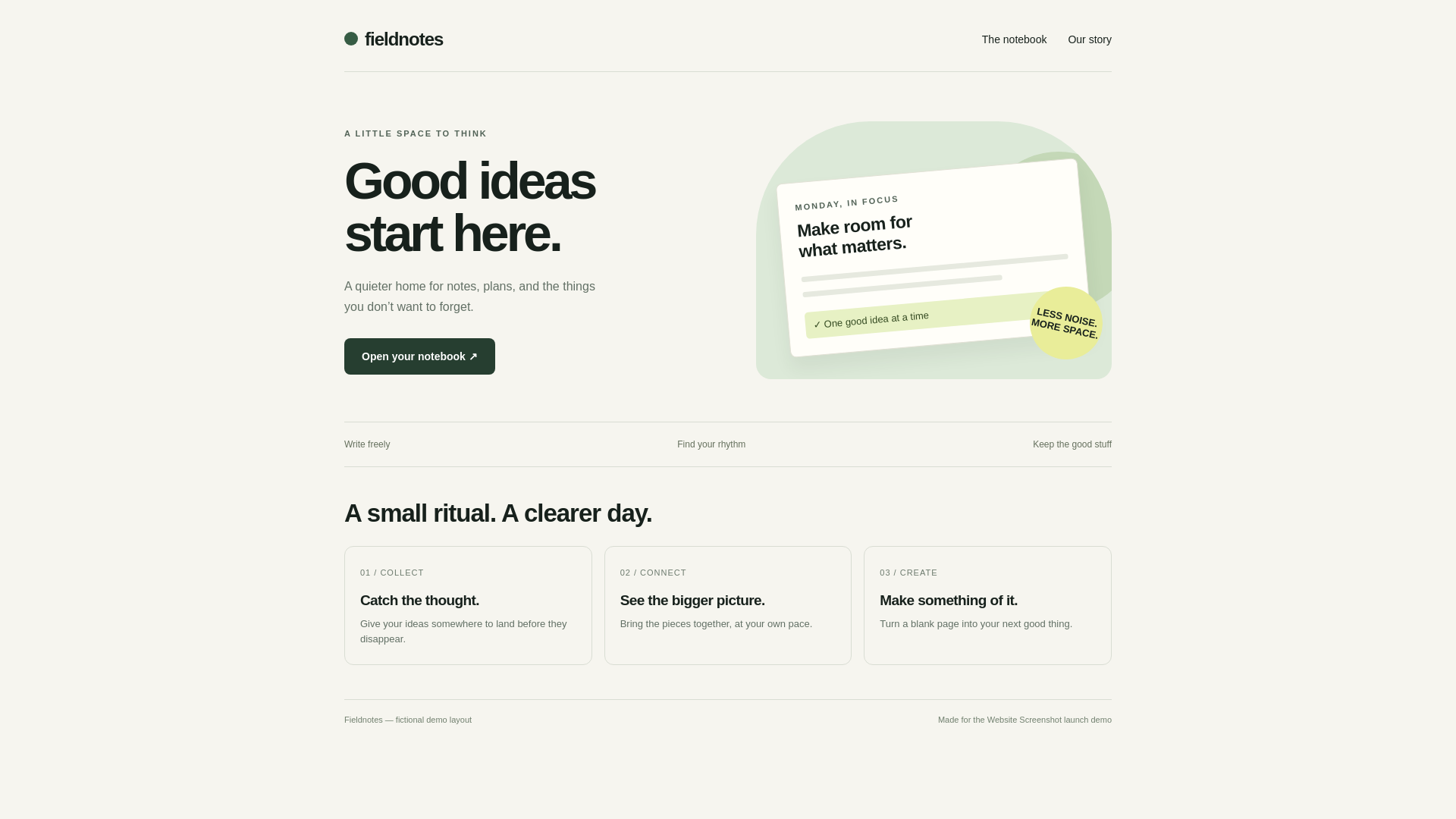
Download the original service file
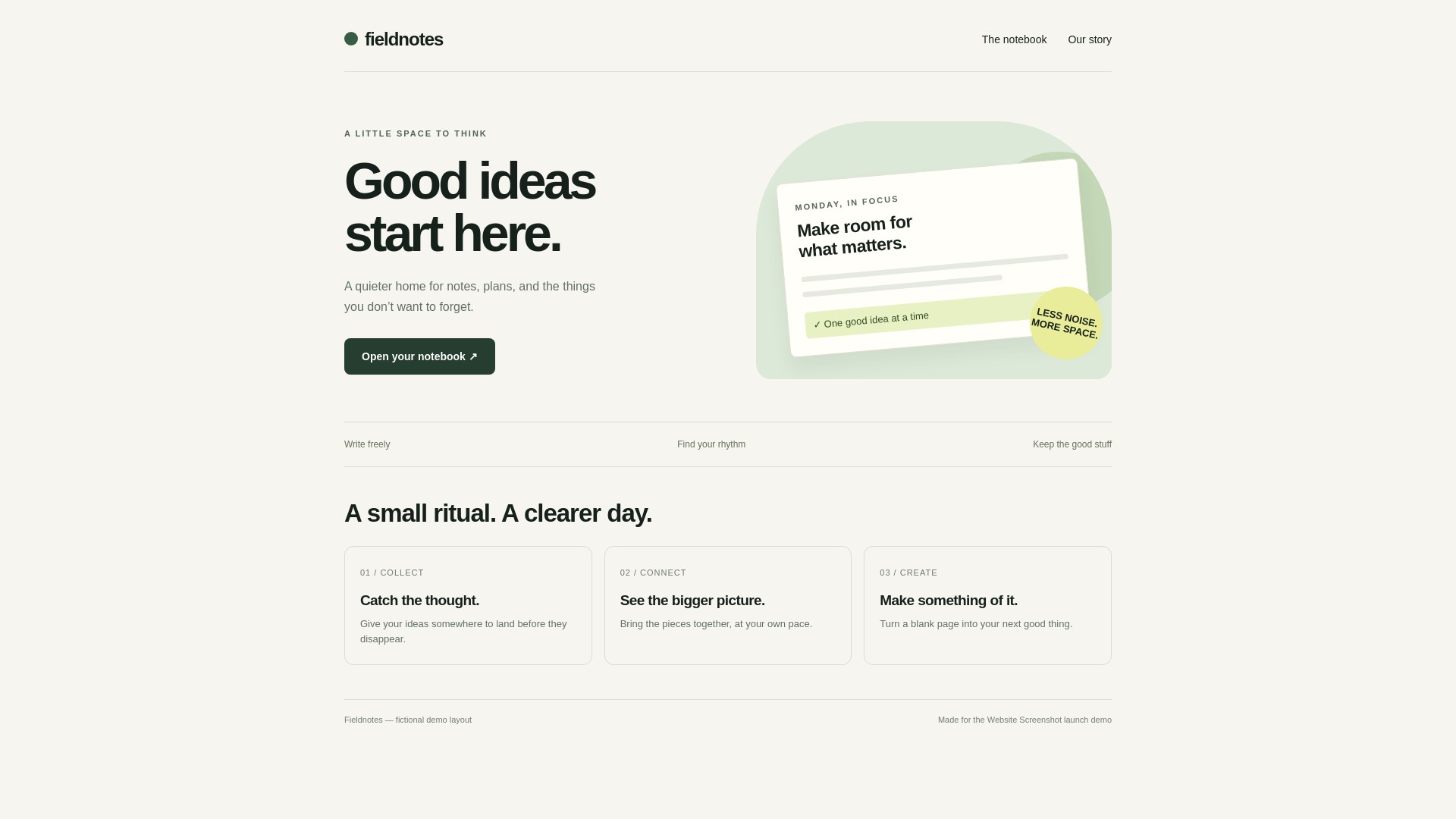
Download the original service file
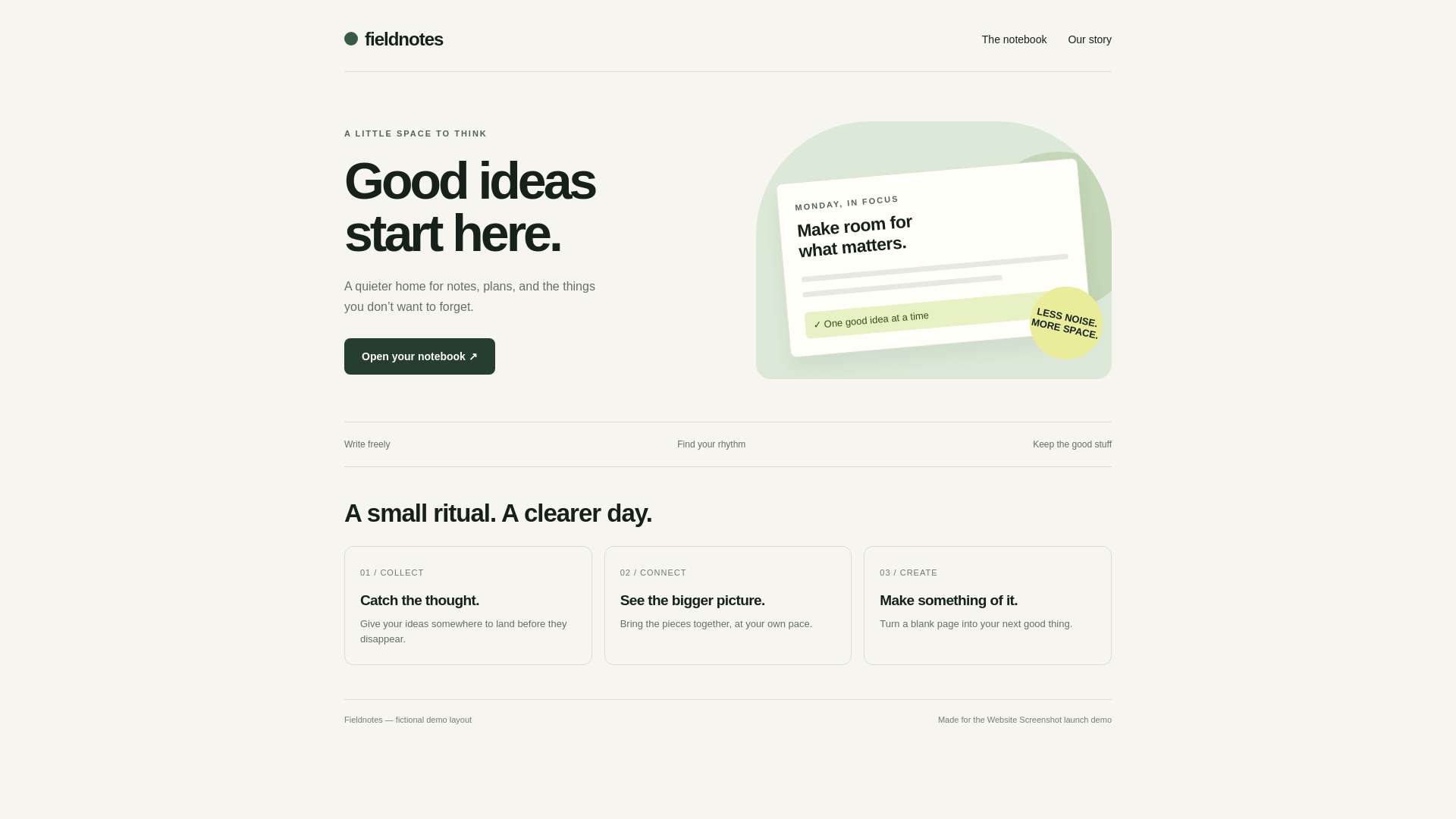
Download the original service file
What this comparison controls
All three files use the same Fieldnotes source, 1920 × 1080 desktop viewport, empty extra CSS and original output size. The source contains system-font text and CSS artwork, not photographs or downloaded fonts.
The opaque example-canvas wrapper makes the visible background consistent. PNG can store transparency while JPG cannot; without controlling the source background, differences in the image viewer can be mistaken for compression differences.
Read the measured sizes without generalizing
The byte counts below come from downloaded service files, not estimates. The PNG row has no JPG quality setting. The two JPG rows use quality values 90 and 60; these are encoder controls, not a percentage of retained detail.
A smaller file is only useful if the visible result still meets your needs. This one layout does not prove that JPG is always smaller, or that the same quality value looks identical across encoders. Results can change with content, dimensions and service updates.
When PNG is a useful default
Use PNG for text-heavy cards, UI reviews, line drawings and situations where you want a lossless raster image. Check the original at the size where it will be displayed: a lossless file can still look soft after scaling.
The current tool requests a transparent page background for HTML-to-PNG. If the output needs a fixed background, put that background on a content container, as this example does. Transparency does not make buttons or links interactive.
When JPG is worth trying
Try JPG when transparency is unnecessary and some compression is acceptable. Compare more than one quality setting with your own content. Look around high-contrast letters, small text and detailed edges before accepting a smaller file.
JPG and JPEG refer to the same format. A file extension change does not convert PNG pixels into JPEG encoding; use the converter and inspect the real output. The files here are genuine JPEG downloads.
Keep image and document goals separate
PNG and JPG store static pixels. If you need a paginated document, consider PDF and inspect its page breaks, print styles and text behavior separately. Do not assume an image export preserves selectable text, live links or accessible document structure.
Neither format comparison nor a mobile viewport preset replaces testing in a physical device or an email client. Choose the workflow that matches the final use, then verify the delivered file.
Frequently asked questions
Is JPG quality 90 lossless?
No. JPG uses lossy compression even at a high quality setting. The number controls the encoder, not a guarantee of pixel identity.
Does JPG support a transparent background?
No. Use a format that supports transparency, such as PNG, when that is needed, and inspect the exported file.
Will a PNG always be larger than a JPG?
No. Size depends on the content, dimensions, encoder and settings. Measure real exports and compare their appearance before choosing.
References and test scope
These guides are based on the actual exports above. Results describe this input and the recorded settings, not a performance, size or compatibility guarantee for every page.