Website Screenshot ·
Why Your HTML Screenshot Looks Different: CSS, Images and Fonts
When an HTML export differs from your preview, first compare the original file at the intended viewport, then isolate extra CSS, unavailable resources and rendering timing. This guide demonstrates a reproducible CSS override: the same Fieldnotes HTML produces a pink artwork background when an extra rule is present, and a green one when that rule is removed. Both PNGs are actual exports.
Open the tool and follow alongDownload and inspect the complete source
All exports below use this original HTML: embedded CSS, system fonts and an opaque background wrapper, with no external image or font requests.
Download Fieldnotes HTMLShow the complete HTML
<!DOCTYPE html>
<html lang="en"><head><meta charset="utf-8"><meta name="viewport" content="width=device-width,initial-scale=1"><title>Fieldnotes — demo page</title>
<style>
*{box-sizing:border-box}body{margin:0;background:#f6f5ef;color:#17211c;font-family:Arial,Helvetica,sans-serif}main{max-width:1120px;margin:auto;padding:38px 54px 52px}nav{display:flex;align-items:center;justify-content:space-between;font-size:14px;border-bottom:1px solid #d9ddd3;padding-bottom:28px}.brand{font-size:24px;letter-spacing:-1px;font-weight:800}.dot{display:inline-block;width:18px;height:18px;border-radius:50%;background:#365c44;margin-right:9px}.navlinks{display:flex;gap:28px}.tag{font-size:11px;font-weight:700;letter-spacing:2px;color:#526357}.hero{display:grid;grid-template-columns:1.1fr 1fr;gap:28px;padding:65px 0 56px;align-items:center}h1{font-size:68px;line-height:1.01;letter-spacing:-4px;margin:20px 0 24px;font-weight:800}p{font-size:16px;line-height:1.65;color:#627065;max-width:350px}.cta{display:inline-block;background:#263e30;color:white;border-radius:8px;padding:16px 23px;font-size:14px;font-weight:700;margin-top:12px}.art{height:340px;background:#dce9d8;border-radius:150px 150px 20px 20px;position:relative;overflow:hidden}.circle{position:absolute;width:210px;height:210px;border-radius:50%;background:#c4d8b7;right:-35px;top:40px}.note{position:absolute;background:#fffef9;border:1px solid #e1e1d5;box-shadow:0 15px 25px #263e3012;border-radius:8px;padding:22px;left:35px;right:35px;top:65px;transform:rotate(-5deg)}.note h3{font-size:23px;margin:10px 0 20px;letter-spacing:-.5px}.line{height:7px;border-radius:3px;background:#e6e9df;margin:13px 0}.tick{background:#e7f1c4;color:#354b22;border-radius:5px;padding:10px;font-size:13px;margin-top:20px}.sticker{position:absolute;right:12px;bottom:26px;background:#e9ed99;border-radius:50%;width:96px;height:96px;display:flex;align-items:center;justify-content:center;text-align:center;transform:rotate(12deg);font-size:13px;font-weight:700}.strip{padding:22px 0;border-top:1px solid #d9ddd3;border-bottom:1px solid #d9ddd3;display:flex;justify-content:space-between;font-size:12px;color:#65705d}.section{padding-top:42px}h2{font-size:33px;letter-spacing:-1px;margin:0 0 24px}.cards{display:grid;grid-template-columns:repeat(3,1fr);gap:16px}.card{padding:24px 20px;border:1px solid #d9ddd3;border-radius:12px;min-height:155px}.card .number{font-size:11px;letter-spacing:1px;color:#6c7a6d}.card h3{font-size:19px;letter-spacing:-.6px;margin:18px 0 10px}.card p{font-size:13px;line-height:1.5;margin:0}.footer{display:flex;justify-content:space-between;margin-top:45px;padding-top:20px;border-top:1px solid #d9ddd3;color:#71806f;font-size:11px}
@media(max-width:600px){main{padding:25px 24px 32px}.brand{font-size:21px}.navlinks{gap:15px;font-size:11px}.hero{grid-template-columns:1fr;padding:36px 0 28px;gap:28px}h1{font-size:55px;letter-spacing:-3px;margin:18px 0}.art{height:300px}.note{top:45px}.strip{font-size:10px;gap:12px}.cards{grid-template-columns:1fr}.card{min-height:130px;padding:22px}.section{padding-top:30px}h2{font-size:29px}.footer{font-size:9px;gap:10px}}
</style></head><body><div class="example-canvas" style="background:#f6f5ef;min-height:1080px"><main><nav><div class="brand"><span class="dot"></span>fieldnotes</div><div class="navlinks"><span>The notebook</span><span>Our story</span></div></nav><section class="hero"><div><span class="tag">A LITTLE SPACE TO THINK</span><h1>Good ideas<br>start here.</h1><p>A quieter home for notes, plans, and the things you don’t want to forget.</p><span class="cta">Open your notebook ↗</span></div><div class="art"><div class="circle"></div><div class="note"><span class="tag">MONDAY, IN FOCUS</span><h3>Make room for<br>what matters.</h3><div class="line"></div><div class="line" style="width:75%"></div><div class="tick">✓ One good idea at a time</div></div><div class="sticker">LESS NOISE.<br>MORE SPACE.</div></div></section><div class="strip"><span>Write freely</span><span>Find your rhythm</span><span>Keep the good stuff</span></div><section class="section"><h2>A small ritual. A clearer day.</h2><div class="cards"><div class="card"><span class="number">01 / COLLECT</span><h3>Catch the thought.</h3><p>Give your ideas somewhere to land before they disappear.</p></div><div class="card"><span class="number">02 / CONNECT</span><h3>See the bigger picture.</h3><p>Bring the pieces together, at your own pace.</p></div><div class="card"><span class="number">03 / CREATE</span><h3>Make something of it.</h3><p>Turn a blank page into your next good thing.</p></div></div></section><div class="footer"><span>Fieldnotes — fictional demo layout</span><span>Made for the Website Screenshot launch demo</span></div></main></div></body></html>
Reproduce the export step by step
- Download the shared Fieldnotes HTML. Paste the complete document into the HTML field, choose PNG and Desktop (1920 × 1080), and keep Original size.
- Paste the override rule below into the separate CSS field. Generate a PNG and download the original: the artwork background should be pink.
- Clear the separate CSS field without editing the HTML. Generate a second PNG: the artwork background should be green.
- Compare both original files at 100%. Only the extra CSS changed; the source, format, viewport and wait settings stayed the same.
- For your own input, add external images, fonts and scripts back one at a time after this self-contained example works. This distinguishes a resource-loading problem from a style problem.
Actual exports and original downloads
Generated through the public tool on 24 October 2026, all at 1920 × 1080. Display zoom: 100%; output size: Original; wait: 1000 ms; Print stylesheet: off. These previews are scaled: download the originals to judge detail.
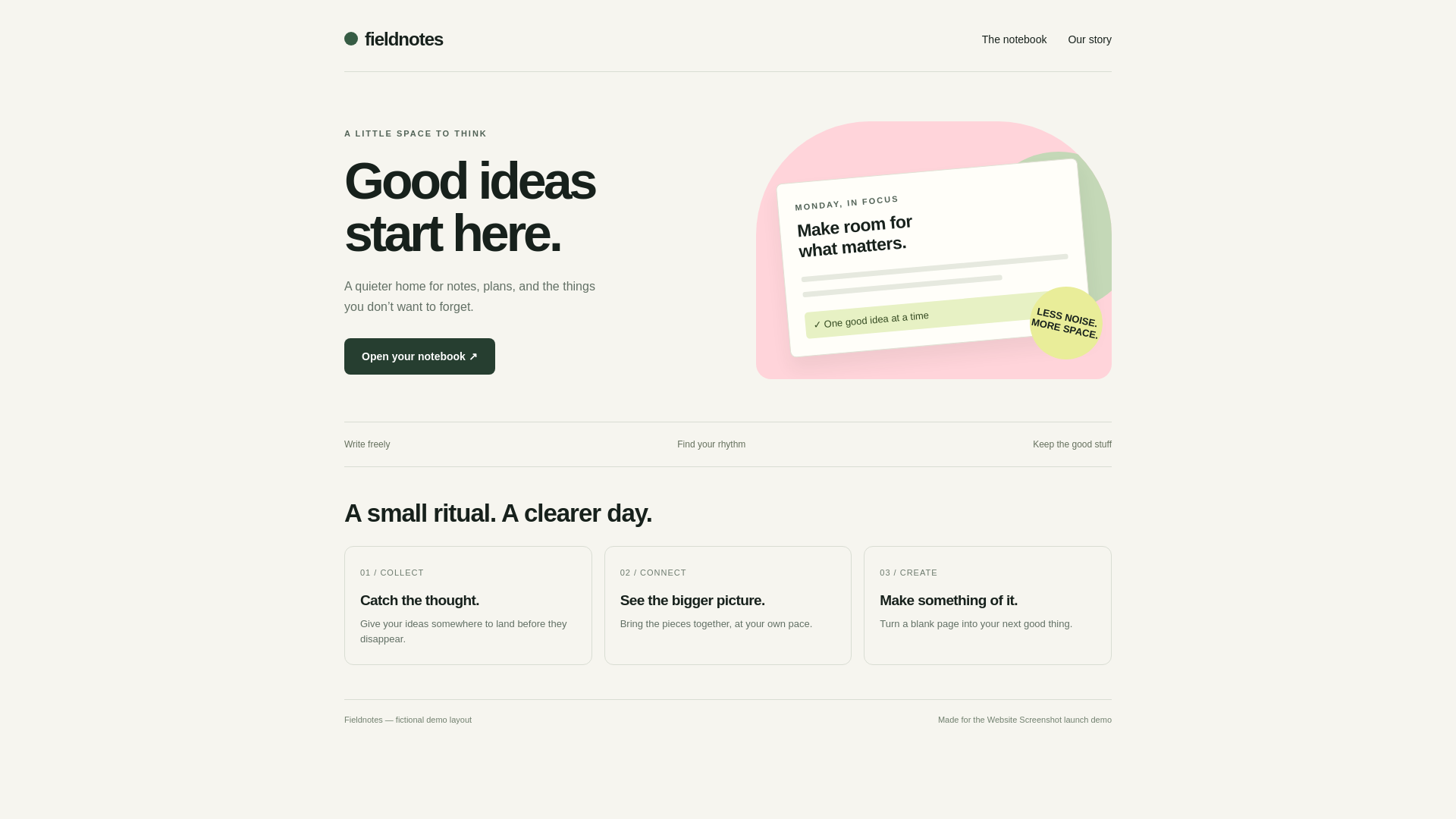
Download the original service file
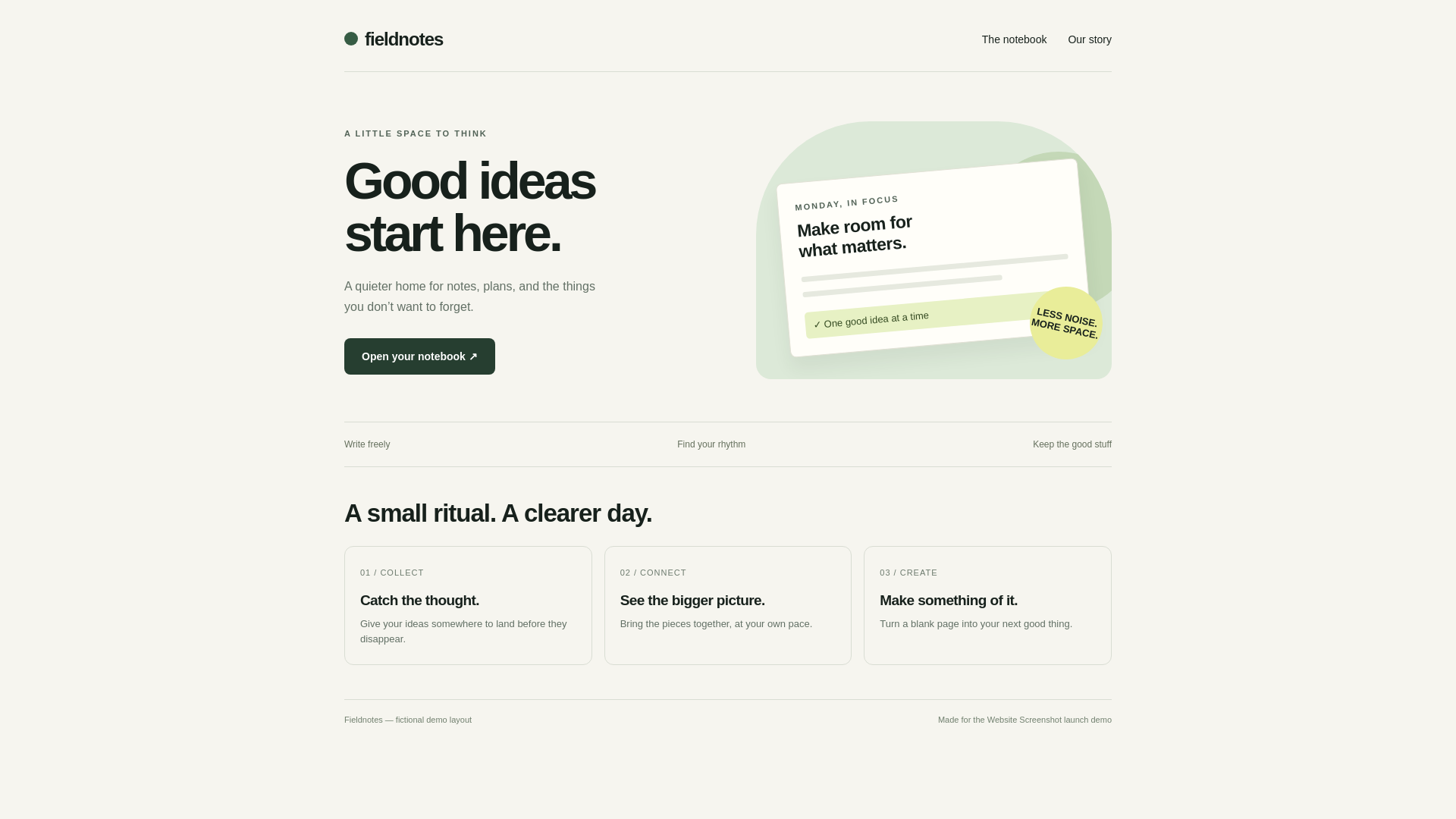
Download the original service file
Case 1: extra CSS overrides embedded styles
The original HTML uses .art { background: #dce9d8; }. The rule below uses the same selector but is appended later by the separate CSS field, so it changes the artwork to #ffd4da.
Removing the rule restores the embedded style. This is normal CSS cascading behavior. A later rule does not always win: higher specificity, !important declarations and other cascade rules also matter.
.art { background: #ffd4da; }Case 2: the page background changes in PNG
The current HTML tool requests a transparent page background for PNG and applies a transparent background to html and body. A background declared only on those root elements can therefore appear different from JPG.
The tutorial source uses an opaque example-canvas wrapper to keep the visible cream background consistent across formats. Give a content container its intended background when you need that color in the PNG; do not assume a transparent image contains the white background shown by a viewer.
<div class="example-canvas"
     style="background:#f6f5ef;min-height:1080px">
  <!-- your layout -->
</div>
Case 3: local images or stylesheets are missing
A reference such as src="./logo.png" or href="styles.css" depends on files and a base location. Pasting HTML does not make those files available to the remote renderer.
Use a publicly accessible absolute URL or embed an asset as a data URL. A URL that works only while you are logged in, on a VPN or on localhost is not a public resource. The uploader does not accept ZIP bundles.
<!-- Local files are not uploaded with pasted HTML. -->
<img src="https://your-public-host.example/logo.png" alt="Logo">
<!-- Replace the example URL with your own accessible asset. -->
Case 4: text uses another font or wraps differently
The remote browser must be able to load a requested web font. A missing font, blocked request or slow response can trigger a fallback, changing glyph widths and line breaks.
First reproduce with a system font, as the Fieldnotes source does. Then add the intended font from an accessible URL. Test a longer delay or a suitable wait selector if needed, but remember that finding an element is not proof that every font and image has loaded.
Case 5: the preview and export are different sizes
The editor scales its preview to fit the available space. Display zoom and the size of that preview are not the same as the pixel dimensions of the downloaded file.
Keep viewport, output size, format and print-style settings unchanged while investigating. Open the original at 100%, check its dimensions, then inspect any responsive breakpoints in the source. A phone preset emulates browser settings; it is not a screenshot from a physical phone.
A short diagnostic sequence
Start with the self-contained source and an empty CSS field. Confirm the viewport and format. Add your CSS, images, fonts and dynamic content one at a time, generating an original download after each meaningful change.
If the source relies on a private site, CAPTCHA, user interaction or an infinite feed, acknowledge that limit rather than repeatedly increasing the wait. This guide explains likely causes; it does not guarantee identical rendering for every HTML document.
Frequently asked questions
Does a wait selector guarantee that the page is fully loaded?
No. It waits for the specified element. Other resources, font loading or later scripts can still change the page.
Will the tool reproduce Gmail or Outlook exactly?
No. It renders HTML in a browser, not in each email client. Use dedicated email-client tests when compatibility is the goal.
Were the two CSS examples edited after export?
No. The PNGs are the original service downloads. The manifest records their source, extra CSS, settings, byte counts and hashes.
References and test scope
These guides are based on the actual exports above. Results describe this input and the recorded settings, not a performance, size or compatibility guarantee for every page.