HTML을 PDF로

HTML과 CSS를 PDF 문서로 렌더링

이미지 대신 인쇄 가능하고 보관 가능한 문서 결과물이 필요할 때 HTML을 PDF로 내보내세요.

  • 무료 사용
  • 가입 불필요
  • PNG · JPG · WebP · PDF

HTML의 내장 스타일을 유지합니다. 로컬 이미지와 글꼴은 자동 업로드되지 않습니다. 공개 URL이나 인라인 리소스를 사용하세요.

휴대폰 프리셋은 브라우저 화면 크기 미리보기이며 실제 기기 테스트가 아닙니다. 긴 페이지와 지연 로딩 콘텐츠는 누락될 수 있습니다.

이 페이지는 html to pdf, render html to pdf, html template to pdf 같은 검색 의도를 위해 만들어졌습니다. 보고서, 송장, 인쇄용 레이아웃, 문서 배포 워크플로에 특히 적합합니다.

See a real example and conversion limits

인기 작업

Real input. Actual output.

An actual PDF exported from complete HTML

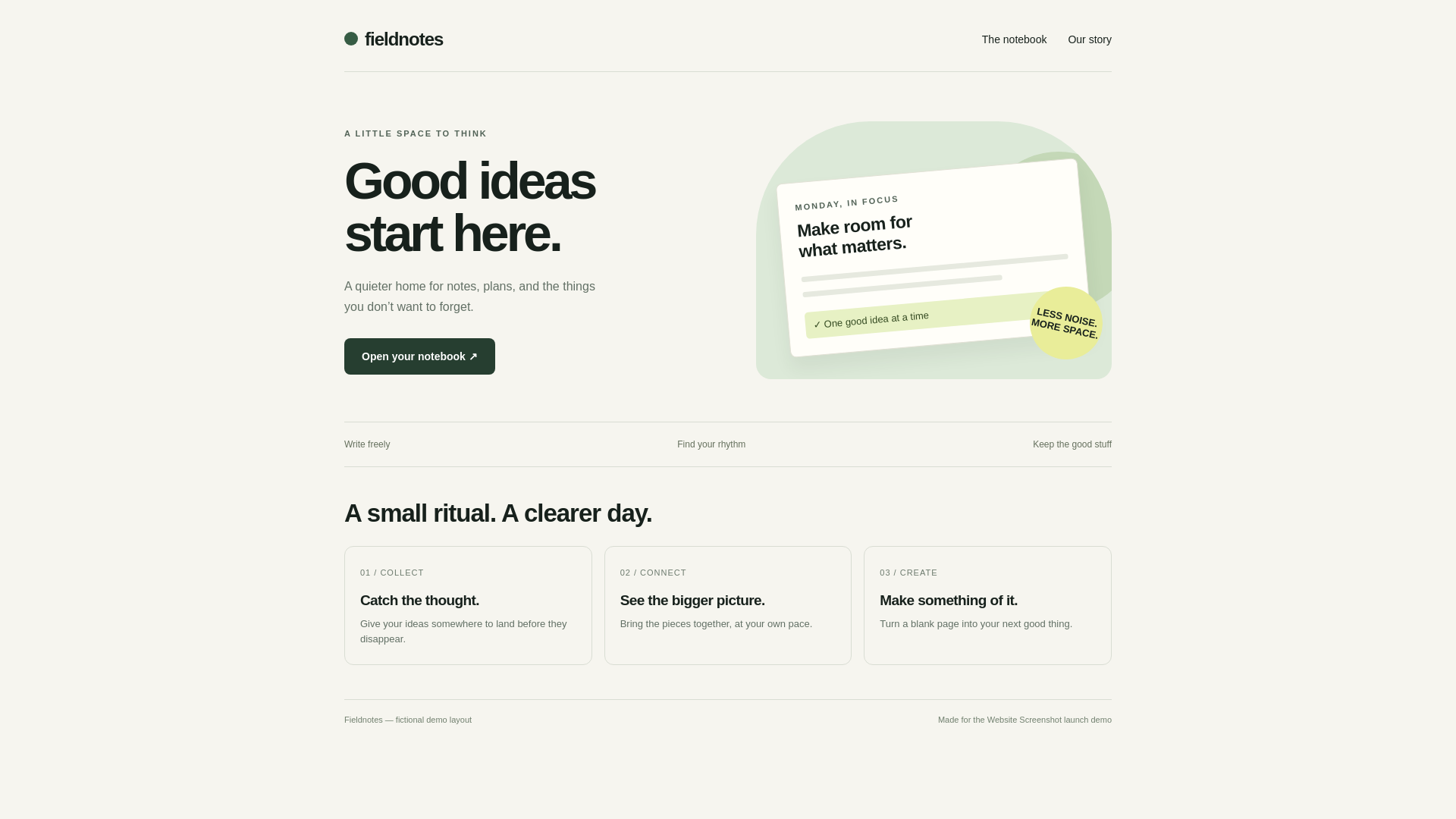
Export the complete Fieldnotes document with embedded CSS as PDF. Download the source and actual PDF below. The reference image is a PNG from the same HTML, not a preview of PDF pagination.

Input: complete HTML document

/examples/tutorials/fieldnotes.htmlDownload the example HTML

Settings to reproduce

  • Complete HTML; separate CSS field empty
  • Format: PDF; Desktop preset; original output size
  • Delay: 1000 ms; print stylesheet off

Try it yourself

  1. Download the source and paste the complete HTML.
  2. Choose PDF in Output and leave the separate CSS field empty.
  3. Convert and download; inspect page breaks in a PDF reader.
Try these settings in the tool
PNG reference from the same Fieldnotes HTML; not a PDF page preview
Actual PDF exported through this tool on 25 October 2026. The reference image is a PNG of the same HTML; PDF page breaks can differ.
Download the actual HTML-to-PDF export

Limitations to know before converting

Complete documents and extra CSS

Embedded style blocks are retained. CSS entered in the separate field is appended after the document styles, so normal CSS specificity and source order apply. A matching rule can override an earlier one.

Images, fonts, and local files

Relative file paths and files on your computer are not automatically uploaded with pasted HTML. Use publicly accessible absolute URLs or inline assets. Blocked resources and fonts that load late can change the result.

PDF layout is not a long PNG

PDF output can paginate and reflow content. Paper size, margins, print CSS, and the target website affect page breaks. Full-page capture does not promise a single extra-long PDF page.

Print CSS and browser printing

Enabling Print stylesheet asks the renderer to use the website’s print styles, which may hide navigation or change the layout. Your browser’s local Print → Save as PDF may differ because of login state, fonts, printer settings, and loaded content.
주요 사용 사례

HTML to PDF 대표 사용 사례

HTML을 PDF로 내보내는 것이 가장 적합한 경우

템플릿, 보고서, 송장, 인쇄용 페이지처럼 HTML 레이아웃을 문서로 배포해야 하는 경우 HTML to PDF가 특히 잘 맞습니다.

Quick Workflow 1

템플릿과 송장에 적합

Quick Workflow 2

인쇄용 HTML에 유용

Quick Workflow 3

문서 배포에 더 적합

FAQ

HTML을 PDF로 변환 FAQ

Website Screenshot은 무료인가요? 계정이 필요한가요?+

네. 온라인 스크린샷과 HTML 변환 도구는 가입이나 설치 없이 무료로 사용할 수 있습니다.

HTML to PNG 대신 HTML to PDF를 언제 써야 하나요?+

보고서, 송장, 인쇄용 페이지처럼 문서형 결과가 필요한 경우 HTML to PDF가 더 적합합니다.

HTML 파일을 업로드해 PDF로 만들 수 있나요?+

예. 코드 붙여넣기와 파일 업로드 모두 지원합니다.

render html to pdf와 print html as pdf는 같은 작업인가요?+

대부분 비슷한 작업을 가리킵니다. HTML을 문서형 PDF로 렌더링하는 의도입니다.

템플릿과 송장 같은 레이아웃에 적합한가요?+

예. 구조화된 HTML 레이아웃을 문서로 배포할 때 특히 잘 맞습니다.

설치 없이 브라우저에서 바로 쓸 수 있나요?+

예. 브라우저에서 바로 실행됩니다.

관련 도구

관련 페이지