HTML スクリーンショット

HTMLとCSSを画像またはPDFに変換

HTMLを貼り付けるかファイルをアップロードして、見た目どおりのスクリーンショットやPDFを生成できます。テンプレート確認、モックアップ、印刷用出力に向いています。

  • 無料で利用可能
  • 登録不要
  • PNG · JPG · WebP · PDF

HTML 内のスタイルを保持します。ローカルの画像やフォントは自動送信されません。公開 URL または埋め込みリソースを使用してください。

スマートフォン設定はブラウザの表示サイズのプレビューで、実機テストではありません。長いページや遅延読込の内容は欠ける場合があります。

このページでは、HTMLやCSSを貼り付けるかファイルをアップロードして、画像またはPDFとして書き出せます。HTML screenshot、HTML to image、HTML to PDF、テンプレート確認、メールレイアウト確認などの用途に合わせたページです。

See a real example and conversion limits

人気のタスク

Real input. Actual output.

Try a real HTML to PNG example

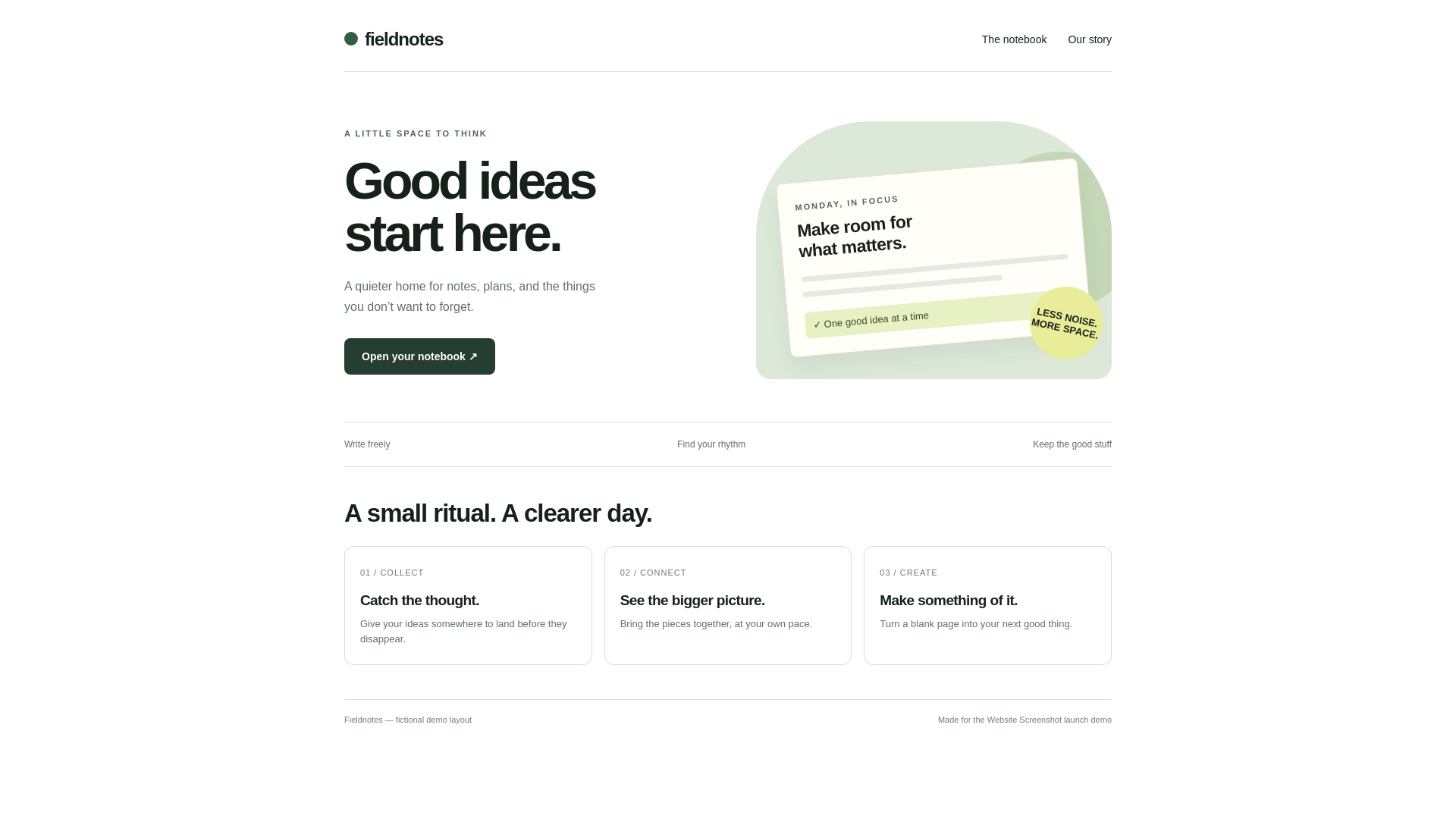
Render Fieldnotes, an original fictional landing page, from one complete HTML document. The example uses embedded CSS and system fonts, with no external images or font downloads.

Input: complete HTML document

/examples/fieldnotes.htmlDownload the example HTML

Settings to reproduce

  • Input: Manual input → HTML
  • CSS field: empty (styles are embedded in the HTML)
  • Format: PNG
  • Device: Desktop (1920 × 1080)
  • Display zoom: 100%; output size: original

Try it yourself

  1. Download the HTML and open it in a text editor, then copy the entire document into the HTML field above.
  2. Leave the separate CSS field empty. Check the green artwork and rounded shapes in the preview.
  3. Choose PNG and the desktop preset, convert, then download the original image.
Try these settings in the tool
Actual PNG export of the Fieldnotes HTML example, with green artwork and three content cards
Actual service export, 24 October 2026: 1920 × 1080 PNG. Fieldnotes is demonstration content, not a customer endorsement.
Download the actual PNG

Limitations to know before converting

Complete documents and extra CSS

Embedded style blocks are retained. CSS entered in the separate field is appended after the document styles, so normal CSS specificity and source order apply. A matching rule can override an earlier one.

Images, fonts, and local files

Relative file paths and files on your computer are not automatically uploaded with pasted HTML. Use publicly accessible absolute URLs or inline assets. Blocked resources and fonts that load late can change the result.

Preview versus export

The preview is scaled to fit the editor. Compare the downloaded original at the intended dimensions. JavaScript, network requests, and rendering timing can make complex pages differ from the local preview.

Browser and email compatibility

This produces a browser rendering, not a test across physical phones or email clients. A screenshot is a static image; links, forms, animations, and video do not stay interactive.
主な利用シーン

HTML書き出しの主な用途

HTMLをJPGに変換して軽量なビジュアルを書き出す

共有用のサンプル画像や軽量なプレビューが欲しいときは、HTML to JPGが扱いやすい選択です。

  • • 軽量で共有しやすい
  • • サムネイルや簡易確認向け
  • • レポート添付にも向く

HTMLをPNGに変換してレイアウトやUIを鮮明に確認

文字やUIの境界を保ちたい場合はHTML to PNGが向いており、メールテンプレートやUI断面の確認に便利です。

  • • UI確認向け
  • • 文字や線がくっきり残る
  • • 視覚QAに向く

WebPでHTMLを現代的な画像形式に変換

HTML to WebPは容量を抑えつつ見た目も維持しやすく、Web用プレビューや共有画像に使えます。

  • • 容量を抑えやすい
  • • 配信用プレビューに向く
  • • モダンな画像形式

HTMLをPDFにして文書ワークフローに載せる

帳票、見積書、レポート、印刷向けテンプレートなど、文書として扱いたい場合はHTML to PDFが適しています。

  • • 帳票や印刷向け
  • • 保存・提出に向く
  • • 文書用途に強い

コード貼り付けとファイルアップロードの両方に対応

短いHTML断片の即時レンダリングにも、完成済みHTMLファイルの書き出しにも同じページで対応できます。

  • • コード貼り付け対応
  • • ファイルアップロード対応
  • • テンプレート確認に便利

FAQ

HTML スクリーンショット FAQ

Website Screenshot は無料ですか?登録は必要ですか?+

無料です。オンラインのスクリーンショットと HTML 変換は、登録やインストールなしで利用できます。

完全なHTML文書の埋め込みCSSは保持されますか?+

はい。styleブロックを含む文書全体を貼り付けてください。追加のスタイルが不要ならCSS欄は空にします。追加CSSは文書のスタイルの後に入り、通常の詳細度と記述順が適用されます。

アップロードできるファイルは?+

.html、.htm、.css、.mhtmlに対応し、1ファイル10 MBまでです。MHTMLはHTMLと解析できる埋め込みリソースを抽出するため、複雑なアーカイブの完全再現は保証しません。ZIPには対応せず、HTMLと同じフォルダーのファイルも自動送信されません。

JPG、PNG、WebP、PDFの選び方は?+

PNGは可逆圧縮で文字やUI向きです。JPGは非可逆圧縮で透明背景には対応せず、容量は内容と品質によって変わります。WebPも画像形式の選択肢です。PDFは改ページされる場合があり、文書の出力に適しています。共有前に実ファイルを確認してください。

変換はすべて端末内で処理されますか?+

いいえ。HTMLまたは公開URLはリモート変換サービスで描画されます。読み込みとプレビューはブラウザー内ですが、出力はローカル処理のみではありません。相対パス、非公開URL、遅いフォント読み込みは差異の原因になります。公開の絶対URLやインライン素材を使ってください。