iPhone Full Page Screenshot

Capture Full Webpages at iPhone 18 Pro and Duo Sizes

Choose 18 Pro, Pro Max or three Duo web viewports. Export PNG, JPG, WebP or PDF for free without signup. Full-page height follows the document; presets are not physical-device tests.

  • Free to use
  • No signup required
  • PNG · JPG · WebP · PDF

Public pages only. Your browser login is not shared; CAPTCHA and access restrictions may prevent capture.

Phone presets preview a browser viewport, not a physical device. Long pages and lazy-loaded content may be incomplete.

Review narrow navigation, wider inner-display grids and document length using fixed web viewports. Duo presets use 1× output in Chrome; they do not emulate Safari or folding hardware.

See a real example and conversion limits

Popular Tasks

Choose an iPhone model

Pick the iPhone size you want to preview before generating the screenshot

iPhone 18 Pro Series

Choose from commonly used iPhone sizes.

2 models

iPhone Duo — web viewport previews

Choose from commonly used iPhone sizes.

3 models

iPhone Air

Choose from commonly used iPhone sizes.

1 models

iPhone 17 Series

Choose from commonly used iPhone sizes.

4 models

iPhone 16 Series

Choose from commonly used iPhone sizes.

5 models

iPhone 15 Series

Choose from commonly used iPhone sizes.

4 models

iPhone 14 Series

Choose from commonly used iPhone sizes.

4 models

iPhone SE / 13 Series

Choose from commonly used iPhone sizes.

5 models

iPhone 12 Series

Choose from commonly used iPhone sizes.

4 models

iPhone 11 / XR / XS / SE

Choose from commonly used iPhone sizes.

7 models

iPhone 18 Pro and Duo: sizes and actual screenshots

Free to use, with no signup. Use 18 Pro and Pro Max for conventional mobile layouts; Duo outer portrait for narrow navigation and the first screen, inner portrait for wider content, and inner landscape for grids and short-height layouts. Choose one preset per capture; one-click multi-device capture and ZIP bundles are not available.

Fixed web viewports and original PNG output; full-page height follows the document
PresetCSS viewportOutput scaleViewport PNG
iPhone 18 Pro402 × 8743×1206 × 2622
iPhone 18 Pro Max440 × 9563×1320 × 2868
iPhone Duo outer portrait382 × 5801×382 × 580
iPhone Duo inner portrait669 × 8671×669 × 867
iPhone Duo inner landscape951 × 5851×951 × 585

Duo uses the small viewport height with expanded toolbars and 1× output. These are not physical-screen or App Store asset dimensions. Chrome does not emulate Safari, fold posture, viewport segments or collapsing browser controls. WebKit: Duo viewport reference

Actual service exports from the same source

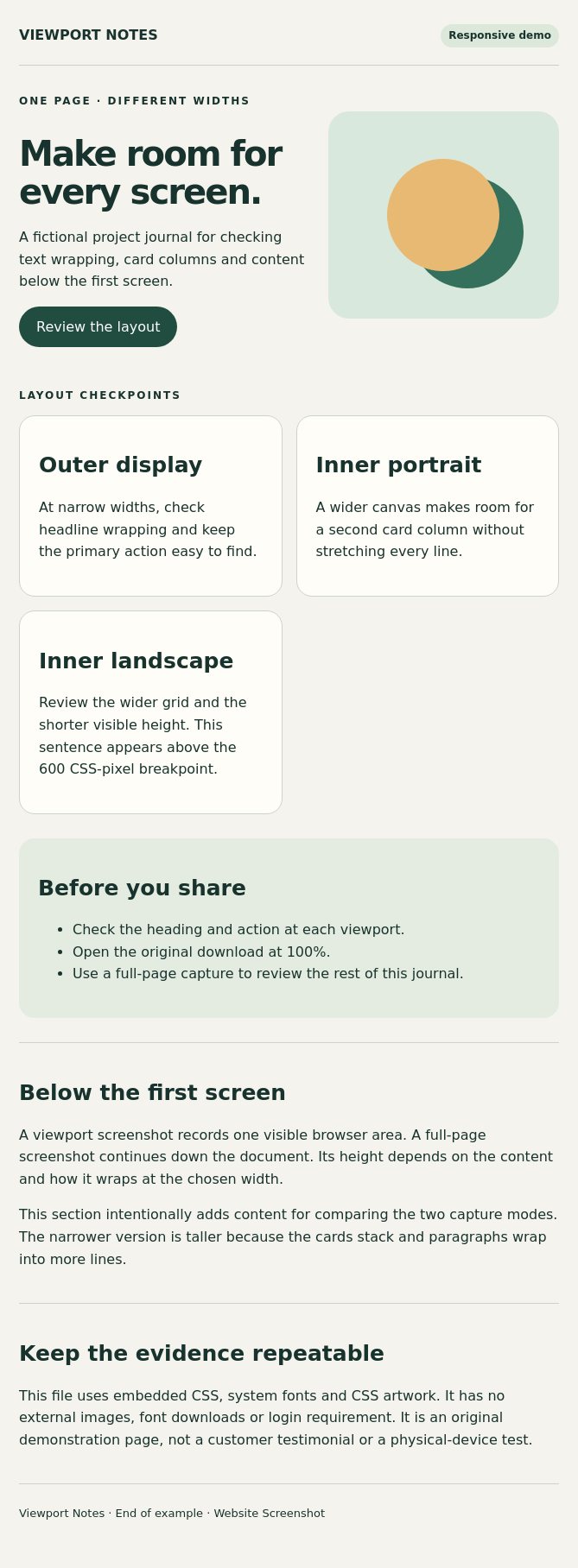
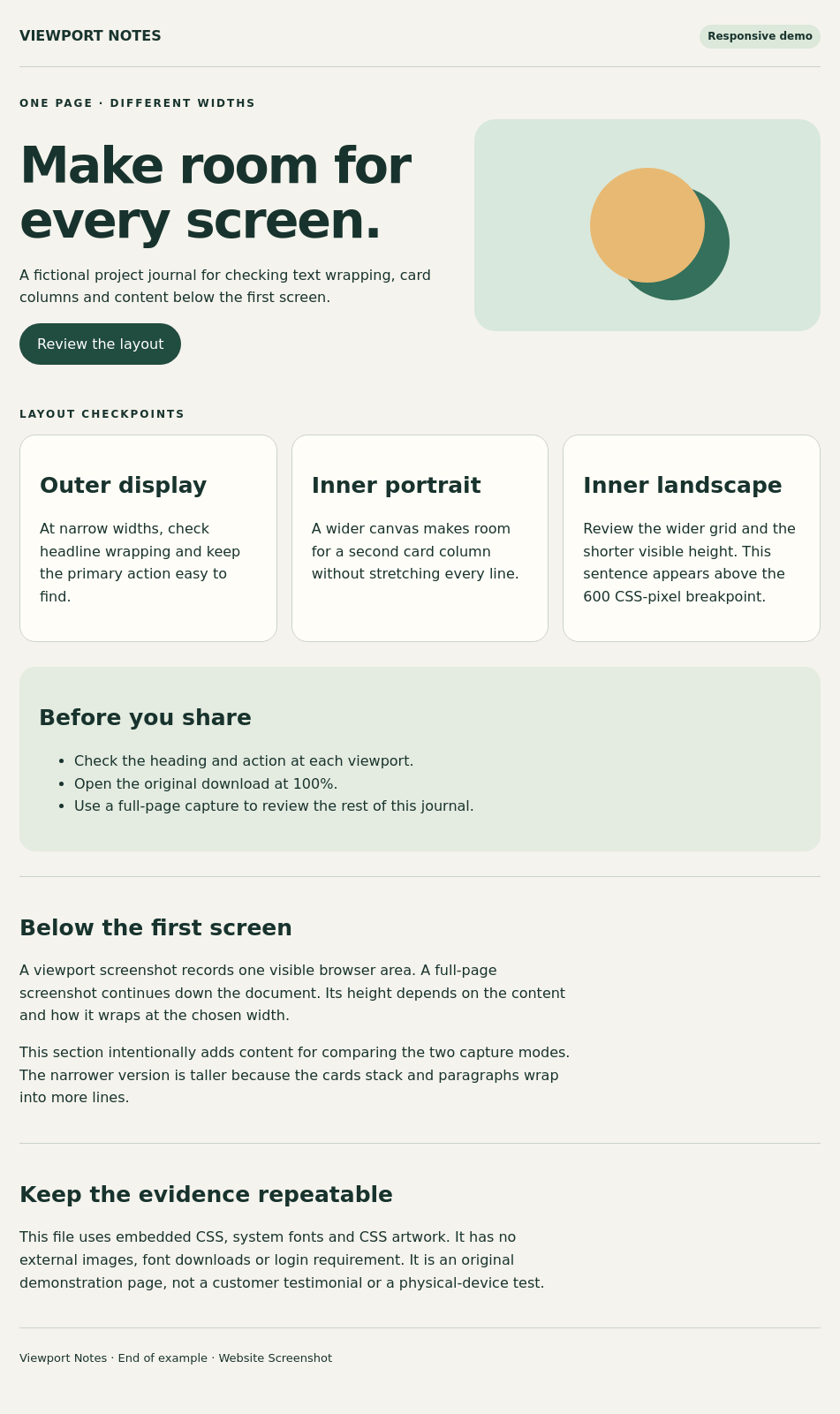
Viewport Notes is an original fictional page using embedded CSS, system fonts and CSS artwork, without external assets. These files were generated by the production backend from the complete HTML; they are not mockups or physical-phone screenshots. Cards stack on narrow screens and reflow into two or three columns at wider widths.

Reproduce: open or download the example page, select a listed preset, PNG and Original output, turn Print stylesheet off, and set wait delay to 0 ms. URL mode offers Viewport or Full page; HTML mode always captures the complete document and cannot reproduce a viewport crop. Exports were generated on 25 October 2026; each figure records its measured pixels and file size.

iPhone 18 Pro · Full page: actual PNG export of the responsive Viewport Notes page
iPhone 18 Pro · Full page

1206 × 7341 PNG · 677.5 KiB

iPhone 18 Pro Max · Full page: actual PNG export of the responsive Viewport Notes page
iPhone 18 Pro Max · Full page

1320 × 6957 PNG · 671.6 KiB

iPhone Duo outer portrait · Full page: actual PNG export of the responsive Viewport Notes page
iPhone Duo outer portrait · Full page

382 × 2493 PNG · 194.6 KiB

iPhone Duo inner portrait · Full page: actual PNG export of the responsive Viewport Notes page
iPhone Duo inner portrait · Full page

669 × 1816 PNG · 191.8 KiB

iPhone Duo inner landscape · Full page: actual PNG export of the responsive Viewport Notes page
iPhone Duo inner landscape · Full page

951 × 1601 PNG · 192.9 KiB

The remote service does not inherit local login sessions or cookies. Private pages, CAPTCHA, lazy loading, infinite scrolling and nested scroll containers can affect results. Full-page width follows the preset while height follows the document, not a fixed screen height.

Common Use Cases

iPhone Full Page Screenshot Use Cases

Review Long iPhone Pages From Top to Bottom

Use iPhone full page screenshot mode when a mobile landing page, article, checkout flow, or onboarding screen extends far beyond the first phone viewport. This gives you one complete long capture instead of several separate mobile screenshots.

Check Responsive Layouts Across iPhone Models

This is useful when sticky headers, stacked cards, mobile CTAs, and long-form content behave differently across iPhone sizes. Teams can compare compact, standard, and Pro Max layouts in one workflow.

  • • Helpful for iPhone responsive QA and client review
  • • Good for signup flows, product pages, and app-style landing pages

Save Complete Mobile Records for Review and Approval

Full-page iPhone captures are useful for QA tickets, design approvals, stakeholder review, and archived documentation when a single first-screen screenshot is not enough.

  • • Useful for internal reports and visual signoff
  • • Stronger fit for long mobile page review than viewport-only capture

FAQ

iPhone Full Page Screenshot FAQ

Is Website Screenshot free, and do I need an account?+

Yes. The online screenshot and HTML conversion tools are free to use, with no registration or installation required.

Can I create an iPhone long screenshot online?+

Yes. This page is built for long iPhone screenshot and full-page iPhone capture tasks directly in the browser.

Can I switch between older and newer iPhone models in full-page mode?+

Yes. You can compare compact, standard, and larger iPhone layouts while staying in the same full-page workflow.

Can I save a long iPhone screenshot as PNG, JPG, WebP, or PDF?+

Yes. Multiple export formats are available from the same long iPhone capture flow.

Can I capture a page that requires my browser login?+

The remote browser does not inherit your Chrome login, cookies, VPN or localhost access. Use publicly accessible URLs. Login screens, CAPTCHA and anti-bot restrictions may prevent capture.

Will full-page mode include every part of a long page?+

It attempts to capture content below the first screen, within time, height and scrolling limits. Infinite feeds, nested scrolling panels and content revealed by clicks may be incomplete. Wait controls can help with loading, but do not guarantee a complete capture.

Which iPhone 18 Pro and Duo sizes are supported?+

18 Pro uses 402 × 874 CSS pixels and Pro Max uses 440 × 956, both at 3× output. Duo provides outer portrait 382 × 580, inner portrait 669 × 867 and inner landscape 951 × 585 at 1× output.

Do Duo presets emulate native Safari and folding?+

No. They are fixed Chrome-rendered web viewport previews, without native Safari, a hinge, fold posture, viewport segments or collapsing browser-control animation. Expanded-toolbar viewport height is not physical-screen resolution.

Why is a Duo full-page PNG taller than the preset?+

Full-page mode keeps the selected CSS width and captures the document. Duo uses 1× output; height varies with text wrapping, stacked cards and content length. Preset height defines a single viewport, not the full document.

Related Tools

Related Pages