تحويل HTML إلى PDF

حوّل HTML وCSS إلى مستند PDF

استخدم هذه الصفحة عندما تحتاج إلى مستند قابل للطباعة أو الأرشفة بدل صورة.

  • استخدام مجاني
  • بدون تسجيل
  • PNG · JPG · WebP · PDF

تُحفظ أنماط HTML المضمنة. لا تُرفع الصور والخطوط المحلية تلقائيًا؛ استخدم روابط عامة أو موارد مضمنة.

إعدادات الهاتف تعرض نافذة متصفح وليست اختبارًا على جهاز فعلي. قد تكون الصفحات الطويلة والمحتويات المؤجلة غير مكتملة.

هذه الصفحة تغطي عمليات البحث مثل HTML to PDF وrender HTML to PDF وhtml template to PDF، وهي مناسبة للفواتير والتقارير والقوالب والتخطيطات المخصصة للطباعة.

See a real example and conversion limits

المهام الشائعة

Real input. Actual output.

An actual PDF exported from complete HTML

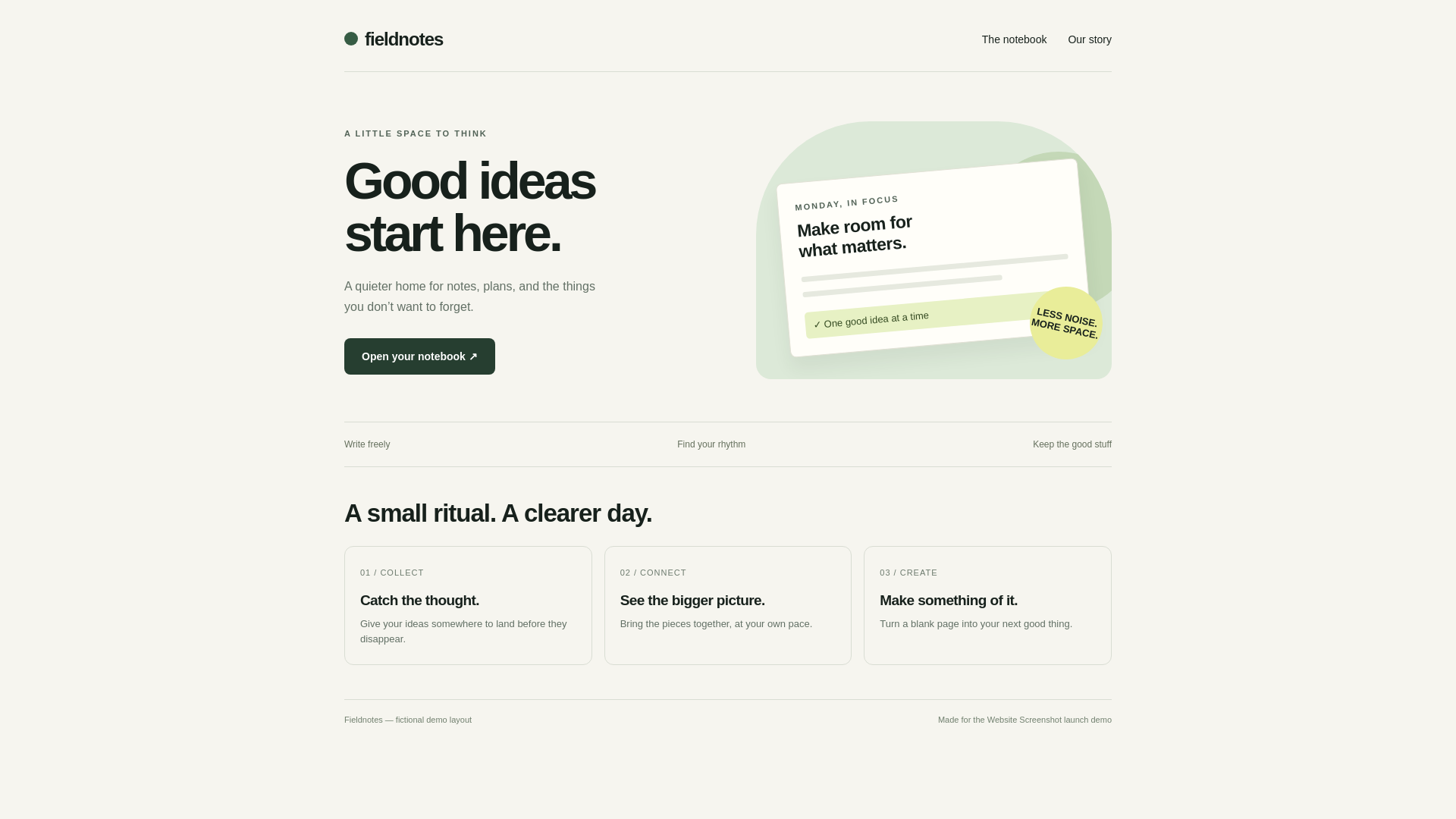
Export the complete Fieldnotes document with embedded CSS as PDF. Download the source and actual PDF below. The reference image is a PNG from the same HTML, not a preview of PDF pagination.

Input: complete HTML document

/examples/tutorials/fieldnotes.htmlDownload the example HTML

Settings to reproduce

  • Complete HTML; separate CSS field empty
  • Format: PDF; Desktop preset; original output size
  • Delay: 1000 ms; print stylesheet off

Try it yourself

  1. Download the source and paste the complete HTML.
  2. Choose PDF in Output and leave the separate CSS field empty.
  3. Convert and download; inspect page breaks in a PDF reader.
Try these settings in the tool
PNG reference from the same Fieldnotes HTML; not a PDF page preview
Actual PDF exported through this tool on 25 October 2026. The reference image is a PNG of the same HTML; PDF page breaks can differ.
Download the actual HTML-to-PDF export

Limitations to know before converting

Complete documents and extra CSS

Embedded style blocks are retained. CSS entered in the separate field is appended after the document styles, so normal CSS specificity and source order apply. A matching rule can override an earlier one.

Images, fonts, and local files

Relative file paths and files on your computer are not automatically uploaded with pasted HTML. Use publicly accessible absolute URLs or inline assets. Blocked resources and fonts that load late can change the result.

PDF layout is not a long PNG

PDF output can paginate and reflow content. Paper size, margins, print CSS, and the target website affect page breaks. Full-page capture does not promise a single extra-long PDF page.

Print CSS and browser printing

Enabling Print stylesheet asks the renderer to use the website’s print styles, which may hide navigation or change the layout. Your browser’s local Print → Save as PDF may differ because of login state, fonts, printer settings, and loaded content.
حالات الاستخدام الشائعة

حالات استخدام HTML to PDF

متى يكون HTML to PDF هو الخيار الأفضل

HTML to PDF مثالي للقوالب والتقارير والفواتير والتخطيطات التي يجب توزيعها كمستند.

Quick Workflow 1

ممتاز للقوالب والفواتير

Quick Workflow 2

مفيد للتخطيطات القابلة للطباعة

Quick Workflow 3

أفضل للتوزيع المستندي

الأسئلة الشائعة

الأسئلة الشائعة حول HTML to PDF

هل Website Screenshot مجاني وهل أحتاج إلى حساب؟+

نعم. أدوات التقاط الصفحات وتحويل HTML عبر الإنترنت مجانية ولا تحتاج إلى تسجيل أو تثبيت.

متى أستخدم HTML to PDF بدل HTML to PNG؟+

عندما تحتاج إلى نتيجة قابلة للطباعة أو الأرشفة أو المشاركة كمستند.

هل يمكنني رفع ملفات HTML وتصديرها إلى PDF؟+

نعم. يدعم كلًا من لصق الكود ورفع الملفات.

هل render HTML to PDF وprint HTML as PDF يعنيان الشيء نفسه؟+

في الغالب نعم. كلاهما يصف تحويل HTML إلى PDF.

هل هذا مناسب للقوالب والفواتير؟+

نعم. هذه من أكثر حالات الاستخدام شيوعًا.

هل أحتاج إلى تثبيت برنامج؟+

لا. كل شيء يعمل داخل المتصفح.

أدوات ذات صلة

صفحات ذات صلة