Website Screenshot ·
如何在线把 HTML 转成 JPG:完整文档实操示例
把 HTML 转成 JPG,可以在 HTML 截图工具中粘贴完整文档;已有内嵌样式时清空独立 CSS 栏,选择 JPG 后转换。本教程使用原创虚构布局 Fieldnotes,提供完整源码和工具实际导出的图片,不需要安装浏览器扩展或编写本地截图脚本。
打开工具跟着操作下载与查看完整源码
下面所有导出都使用这份原创 HTML。包含内嵌 CSS、系统字体和不透明背景容器,没有外部图片或字体请求。
下载 Fieldnotes HTML展开完整 HTML
<!DOCTYPE html>
<html lang="en"><head><meta charset="utf-8"><meta name="viewport" content="width=device-width,initial-scale=1"><title>Fieldnotes — demo page</title>
<style>
*{box-sizing:border-box}body{margin:0;background:#f6f5ef;color:#17211c;font-family:Arial,Helvetica,sans-serif}main{max-width:1120px;margin:auto;padding:38px 54px 52px}nav{display:flex;align-items:center;justify-content:space-between;font-size:14px;border-bottom:1px solid #d9ddd3;padding-bottom:28px}.brand{font-size:24px;letter-spacing:-1px;font-weight:800}.dot{display:inline-block;width:18px;height:18px;border-radius:50%;background:#365c44;margin-right:9px}.navlinks{display:flex;gap:28px}.tag{font-size:11px;font-weight:700;letter-spacing:2px;color:#526357}.hero{display:grid;grid-template-columns:1.1fr 1fr;gap:28px;padding:65px 0 56px;align-items:center}h1{font-size:68px;line-height:1.01;letter-spacing:-4px;margin:20px 0 24px;font-weight:800}p{font-size:16px;line-height:1.65;color:#627065;max-width:350px}.cta{display:inline-block;background:#263e30;color:white;border-radius:8px;padding:16px 23px;font-size:14px;font-weight:700;margin-top:12px}.art{height:340px;background:#dce9d8;border-radius:150px 150px 20px 20px;position:relative;overflow:hidden}.circle{position:absolute;width:210px;height:210px;border-radius:50%;background:#c4d8b7;right:-35px;top:40px}.note{position:absolute;background:#fffef9;border:1px solid #e1e1d5;box-shadow:0 15px 25px #263e3012;border-radius:8px;padding:22px;left:35px;right:35px;top:65px;transform:rotate(-5deg)}.note h3{font-size:23px;margin:10px 0 20px;letter-spacing:-.5px}.line{height:7px;border-radius:3px;background:#e6e9df;margin:13px 0}.tick{background:#e7f1c4;color:#354b22;border-radius:5px;padding:10px;font-size:13px;margin-top:20px}.sticker{position:absolute;right:12px;bottom:26px;background:#e9ed99;border-radius:50%;width:96px;height:96px;display:flex;align-items:center;justify-content:center;text-align:center;transform:rotate(12deg);font-size:13px;font-weight:700}.strip{padding:22px 0;border-top:1px solid #d9ddd3;border-bottom:1px solid #d9ddd3;display:flex;justify-content:space-between;font-size:12px;color:#65705d}.section{padding-top:42px}h2{font-size:33px;letter-spacing:-1px;margin:0 0 24px}.cards{display:grid;grid-template-columns:repeat(3,1fr);gap:16px}.card{padding:24px 20px;border:1px solid #d9ddd3;border-radius:12px;min-height:155px}.card .number{font-size:11px;letter-spacing:1px;color:#6c7a6d}.card h3{font-size:19px;letter-spacing:-.6px;margin:18px 0 10px}.card p{font-size:13px;line-height:1.5;margin:0}.footer{display:flex;justify-content:space-between;margin-top:45px;padding-top:20px;border-top:1px solid #d9ddd3;color:#71806f;font-size:11px}
@media(max-width:600px){main{padding:25px 24px 32px}.brand{font-size:21px}.navlinks{gap:15px;font-size:11px}.hero{grid-template-columns:1fr;padding:36px 0 28px;gap:28px}h1{font-size:55px;letter-spacing:-3px;margin:18px 0}.art{height:300px}.note{top:45px}.strip{font-size:10px;gap:12px}.cards{grid-template-columns:1fr}.card{min-height:130px;padding:22px}.section{padding-top:30px}h2{font-size:29px}.footer{font-size:9px;gap:10px}}
</style></head><body><div class="example-canvas" style="background:#f6f5ef;min-height:1080px"><main><nav><div class="brand"><span class="dot"></span>fieldnotes</div><div class="navlinks"><span>The notebook</span><span>Our story</span></div></nav><section class="hero"><div><span class="tag">A LITTLE SPACE TO THINK</span><h1>Good ideas<br>start here.</h1><p>A quieter home for notes, plans, and the things you don’t want to forget.</p><span class="cta">Open your notebook ↗</span></div><div class="art"><div class="circle"></div><div class="note"><span class="tag">MONDAY, IN FOCUS</span><h3>Make room for<br>what matters.</h3><div class="line"></div><div class="line" style="width:75%"></div><div class="tick">✓ One good idea at a time</div></div><div class="sticker">LESS NOISE.<br>MORE SPACE.</div></div></section><div class="strip"><span>Write freely</span><span>Find your rhythm</span><span>Keep the good stuff</span></div><section class="section"><h2>A small ritual. A clearer day.</h2><div class="cards"><div class="card"><span class="number">01 / COLLECT</span><h3>Catch the thought.</h3><p>Give your ideas somewhere to land before they disappear.</p></div><div class="card"><span class="number">02 / CONNECT</span><h3>See the bigger picture.</h3><p>Bring the pieces together, at your own pace.</p></div><div class="card"><span class="number">03 / CREATE</span><h3>Make something of it.</h3><p>Turn a blank page into your next good thing.</p></div></div></section><div class="footer"><span>Fieldnotes — fictional demo layout</span><span>Made for the Website Screenshot launch demo</span></div></main></div></body></html>
按步骤复现
- 下载下方示例 HTML,用文本编辑器打开,复制包括 DOCTYPE、head、style 和 body 在内的完整文档。
- 打开 HTML 截图工具,选择“手动输入”。先点 CSS 并清空示例规则,再点 HTML 粘贴完整文档。这里输入的是代码,不是网址。
- 在显示设置中选择桌面(1920 × 1080),显示缩放保留 100%。HTML 工作流会捕获渲染后的文档,内容更长时可能导出更高的图片。
- 输出格式选择 JPG,将 JPG 质量设为 90,输出尺寸保留原始尺寸。90 是编码器设置,不代表保证还原 90% 的视觉细节。
- 等待延迟保持 1000 毫秒,关闭打印样式。示例使用系统字体,不请求外部图片,因此无需等待选择器。
- 点击“转换为图片”,等待结果后选择“下载原图”。以 100% 查看原始文件,检查文字、背景、尺寸和页面底部。
实际导出与原始下载
以下文件于 2026 年 10 月 24 日通过公开工具实际生成,全部为 1920 × 1080。显示缩放为 100%,输出尺寸为原始尺寸,等待 1000 毫秒,打印样式关闭。预览会缩放,判断细节请下载原图。
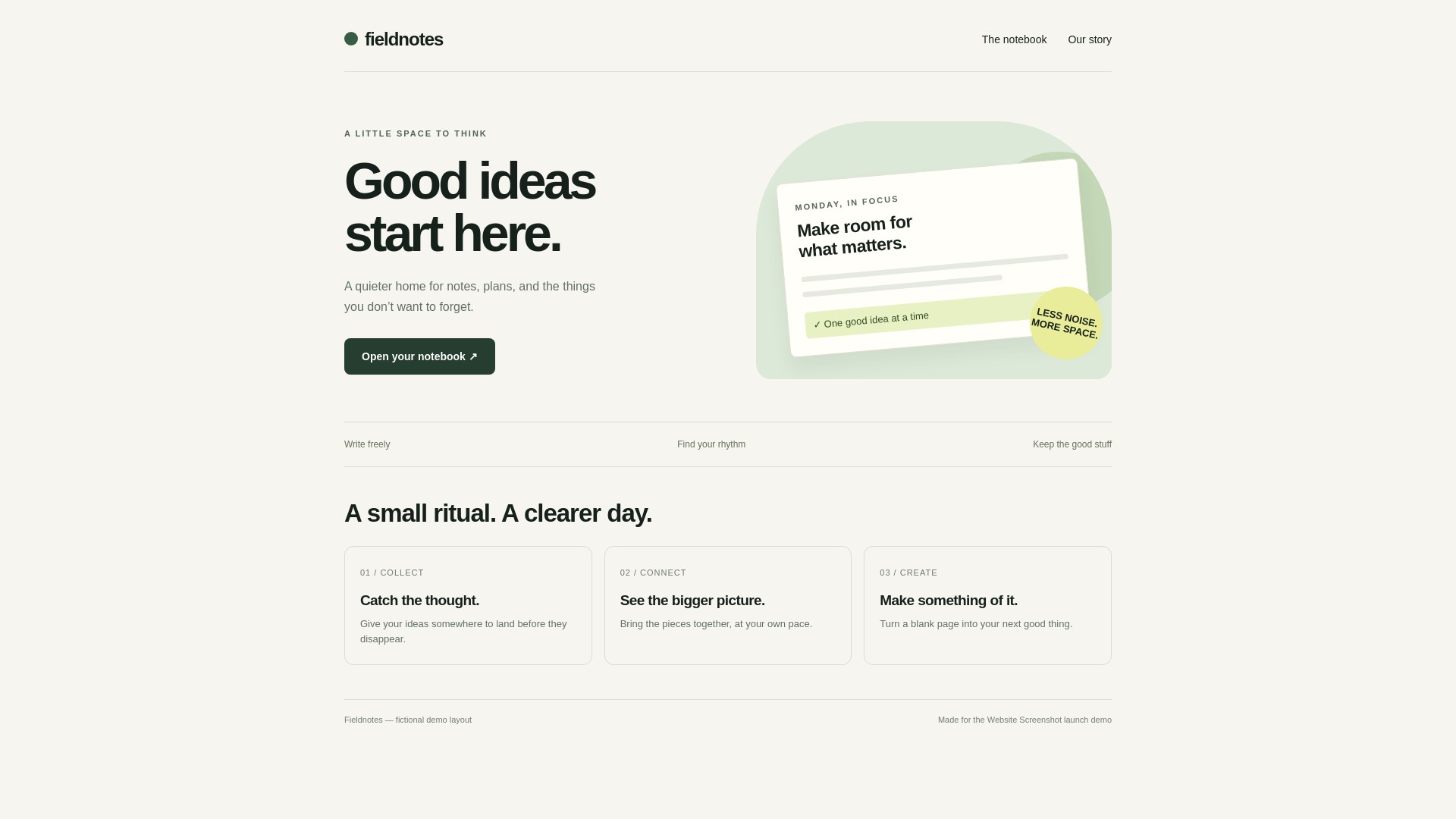
下载服务原始文件
转换的是什么
HTML 描述页面结构;JPG 保存静态的像素渲染结果,不能继续编辑原来的 HTML。按钮、链接、表单、动画和视频不会保留交互能力。
Fieldnotes 由文字、CSS 图形和卡片组成。源码的 example-canvas 容器设置了明确的不透明背景和 1080px 最小高度,让 PNG 与 JPG 可以在相同可见背景下比较。它是演示内容,不代表客户案例或推荐。
为什么独立 CSS 栏要留空
完整文档已经包含 style 样式块。工具保留内嵌样式,并把独立 CSS 栏的规则追加到后面。如果那里还留着示例规则,匹配的样式可能覆盖你自己的文档。
需要额外规则时再填写 CSS。如果导出与输入不同,先清空该栏,并检查下载的原图;编辑器里缩放后的预览不能替代原图检查。
<style>
  .card { border-radius: 12px; }
</style>
<!-- 将样式保留在完整 HTML 文档中。 -->
也可以上传文件
文件上传支持 .html、.htm、.css、.mhtml,单个文件最多 10 MB。可以上传本教程的 HTML 文件,确认预览后再转换。
上传 HTML 不会自动上传旁边文件夹中的图片和字体,也不接受 ZIP 资源包。MHTML 会尝试提取 HTML 和可解析的内嵌资源,但不保证任意网页归档都能完整复现。
分享 JPG 前检查什么
JPG 使用有损压缩,不支持透明背景。文字边缘可能比 PNG 软,经过社交平台再次缩放或压缩后差异也可能增加。请用原始下载文件作比较。
文字密集或细线较多的界面,建议先比较格式教程中的 PNG。照片较多的页面要用自己的内容重新测试:这个文字和 CSS 图形示例不能证明 JPG 对所有内容都更小。
结果缺失或不一致时
图片和字体应使用可公开访问的绝对地址或内联资源。./logo.png 之类的相对路径不会把电脑上的文件一起发送给渲染器。需要登录、被拦截或加载较慢的资源也可能改变结果。
HTML 会提交到远程转换服务,该服务不会继承本地浏览器的登录、VPN 或 localhost 访问权限。延长等待可能帮助较慢的公开资源,但不能解锁私有资源。可按排错教程逐项定位。
常见问题
JPG 和 JPEG 是同一种格式吗?
是,两者是同一种图片格式的常见文件扩展名。本教程的真实下载使用 .jpg 扩展名。
生成示例需要账号吗?
不需要。教程中的文件通过未登录浏览器在公开工具中生成;这不代表承诺无限使用或服务始终可用。
所有 HTML 都会导出为 1920 × 1080 吗?
不会。这是本示例的源码和视口设置对应的结果。更长的内容、不同视口或输出尺寸设置都会影响最终尺寸。
参考与测试范围
教程基于上述真实导出。结果适用于这份输入和记录的设置,不代表所有页面的性能、尺寸或兼容性保证。